At a community event, the first visitor may be ready to play immediately. The next may want to watch, ask a question or skip the camera. A welcoming station makes those choices easy, while keeping the line moving and the play area clear.
The goal is a memorable shared activity. You do not need to turn the event into a fitness test. A visible game task, a friendly host and a fair turn can do more for participation than an elaborate public leaderboard.
What research can inform an event?
A group dance-game pilot reported sustained enjoyment in its supervised adolescent program. A home exergaming trial paired games with coaching and a schedule. Both make social support worth considering, but neither tests a drop-in MovePlay event or proves that a single station changes health.
Use those findings as a reason to pay attention to the surrounding experience: explain the task, offer a practice and let people choose their role. The station plan below is an organizer’s practical suggestion, not a replication of a studied intervention.
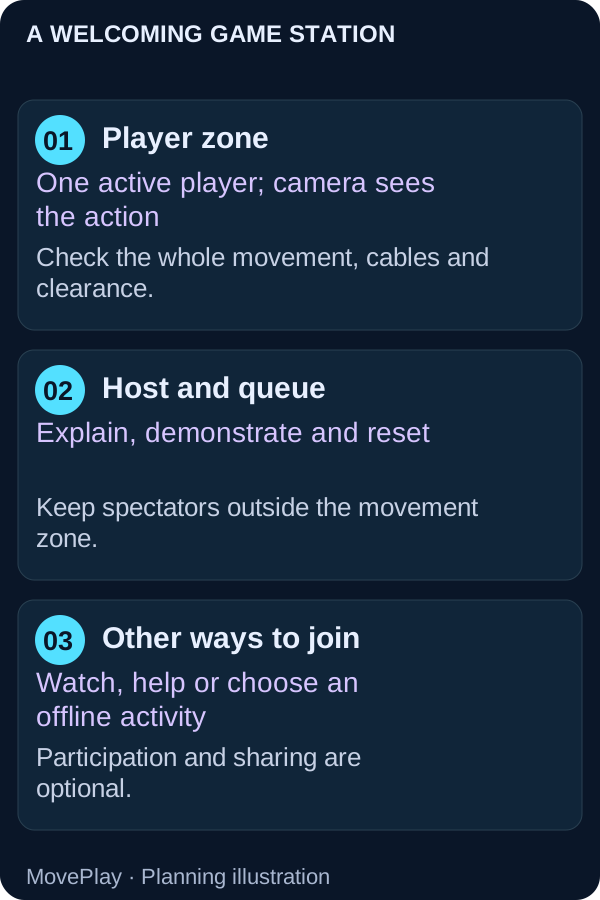
Separate the playing area from the waiting area
Keep the camera directed at the active player and the queue outside the movement zone. Place cables where they do not cross an entry path. The display should be visible without asking spectators to lean into the camera frame. Check the full action, including reaching or leaning, rather than only the player’s standing position.
The diagram shows roles, not minimum distances. Use the setup guide to test framing on the actual device. If you mirror to a larger display, follow the TV and projector guide; the camera belongs to the device running the game.
Choose a loop a visitor can understand quickly
Fruit Slash gives a player a visible fruit-cutting task. Hoop Streak offers a basketball-themed shooting challenge. Explain the actual control from the tutorial before the visitor starts, and run a practice yourself so you know what a new player will see.
Preview the sounds, result screen, restart and account requirements. Do not advertise a title as free solely because its description is publicly readable. The game examples below show current free or Pro access; confirm event and organizational use against the applicable plan and terms before promising access to a group.
A turn format that feels fair
- Welcome: ask whether the visitor would like to play, watch or help explain the next turn.
- Demonstrate: show one control and the stop cue.
- Practice: give a newcomer time to understand the feedback before comparing results.
- Play: use the endpoint you announced, with permission to stop earlier.
- Reset: clear the station for the next person and ask what was enjoyable.
Use equal opportunities, rather than assuming equal scores mean equal ability. A camera miss or unfamiliar instruction can change a result. A cooperative challenge such as “help the next visitor understand the first cue” can include people who do not want to perform.
Offer meaningful alternatives
A smaller-control puzzle may suit a visitor who prefers less whole-body movement, but do not assume a game works seated or with every mobility pattern. Test its required input. A host, observer or offline participant role should also be welcome.
The WHO guidelines address activity across different populations and abilities. They are a reason to provide choices, not to promise that one game is accessible or medically suitable for everyone. A visitor’s own comfort and preferences should guide participation.
Keep privacy and sharing optional
Explain camera use before a visitor enters the frame. Close the session when the station finishes. Consult the camera and data explanation for the distinction between local movement input and account, analytics, session and sharing data. Follow your organization’s consent and safeguarding procedures, especially for children.
A result card can be a fun invitation after play, but posting a photo or result should never be required to take a turn. Do not announce that the station records no personal information without checking the actual setup and services in use.
Measure the experience you actually delivered
Useful event observations include how many people chose a turn, how long setup and waiting took, which controls needed explanation and whether visitors wanted another attempt. Collect feedback without unnecessary personal data. Game scores and estimated calories are not evidence of a health improvement.
Compare puzzle controls in the public game catalog, or use the shared-turn guide for a smaller group. Preview the games below and check access before setting the event schedule.
Sources and further reading
- A 12-week randomized controlled pilot study of dance exergaming in a group: Influence on psychosocial factors in adolescent girls (2018) — Pilot randomized trial, 41 adolescents.
- Home-based exergaming among children with overweight and obesity: a randomized clinical trial (2018) — 24-week randomized trial, 46 children.
- WHO guidelines on physical activity and sedentary behaviour (2020) — WHO guidelines.
Games to preview
Review the controls, play area and access label before opening a game.

Fruit Slash
Slice flying fruit with sweeping arms and stop the swing when a bomb enters the path.
Controls: Sweep an arm across fruit; pull back from bombs.
First-round idea: Cut a clean fruit streak without touching a bomb.
Pro · sign-in required

Hoop Streak
Catch a pass with a side-step, lift the ball overhead and time the release to sink the basket.
Controls: Side-step to catch; raise a hand overhead and lower it to release.
First-round idea: Catch a pass and land a basket before trying a scoring streak.
Pro · sign-in required