For an older adult who wants to try motion games, start with a small movement that feels comfortable and a game whose instructions are easy to follow. Head aiming or hand gestures may require less floor travel than jumping or fast pose matching. Game choice depends on the person's preferences and the movement required, rather than age alone.
Choose the movement before the score
| Starting option | What controls the game | What to check |
|---|---|---|
| LaserEyes | Small head turns aim; holding the aim fires. | Comfortable head movement, clear targets and whether the camera tracks the chosen seated or standing position. |
| GestureChess | Pinch gestures select and move chess pieces. | Hand visibility and a stable gesture; this also requires understanding chess rules. |
| Snake | Palm position steers the snake. | A comfortable hand position and whether the increasing speed remains enjoyable. |
These are options to test, not an accessibility certification or a promise that every person can use them seated. A timer, target speed or gesture threshold can still be demanding. Choose another activity when the required movement is uncomfortable.
Set up the first turn
- Put the screen at a comfortable viewing height, with the camera pointing at the body area the selected game needs.
- Choose a clear position with no need to step around furniture. If sitting, use a stable chair appropriate for the person.
- Ask a helper to demonstrate the start, action and restart controls if useful. Try the movement while checking the camera guide.
- Play one short round and pause. There is no need to chase a score or continue when tired, dizzy or uncomfortable.
Read the camera and lighting checklist. For a shared family session, the multi-generation guide explains how to alternate turns and offer different roles without assuming everyone has the same abilities.
Playing together
Take turns on one device, or help someone choose a game and watch the round. A shared score can be a conversation starter; it does not need to become a competition. If you use a separate video call, keep it from competing with the game's camera access. This page does not claim that the games provide built-in remote multiplayer.
Accounts, costs and camera data
Browse the hub first to see the current free selection. Paid games require sign-in and a Pro entitlement; confirm current plans before selecting one. Camera frames for tracking are processed locally, while account and game-session services have separate data rules described in the privacy policy.
Recreation and health are different questions
MovePlay is recreational software. This page provides no claim about reducing falls, treating a condition, improving cognition or producing an effect within a week. Game scores measure performance inside the game. If an existing care plan restricts movement, ask the treating professional whether the specific movement is appropriate before playing.
Questions from players and families
Can I sit down to play?
Try a head- or hand-led game and confirm that the tracker sees the required body area while seated. A game that requires knees, jumping or rapid full-body poses should not be described as a seated option.
Can I slow down every game?
No. Difficulty and timers differ by title. Check the tutorial and first round; a different game may be a better choice than trying to adapt to an uncomfortable pace.
Do game scores measure balance or health?
No. Scores depend on rules, camera conditions and familiarity with the controls. They are not clinical measurements.
Games to preview
Review the controls, play area and access label before opening a game.
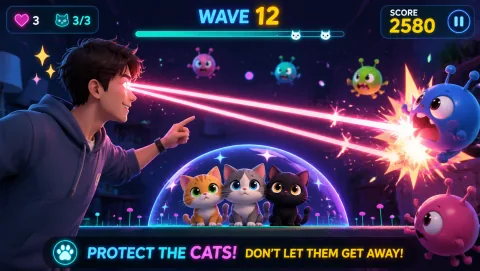
Laser Eyes
Aim lasers with head orientation and protect the cat from approaching monsters.
Controls: Turn your head to aim; keep the face visible.
First-round idea: Track a monster while keeping the cat out of the firing line.
Pro · sign-in required

Cloud Flight
Spread your arms to fly and bank through colorful rings in a cloud course.
Controls: Spread arms, tilt or move sideways, squat to descend and raise hands to climb.
First-round idea: Line up with a ring before changing height.
Pro · sign-in required