Hand-tracking games use a visible hand as input: a pinch can confirm a chess move, dragging can untangle a puzzle, and hand placement can select targets. You may also see these described as gesture-controlled or hand-controlled camera games. The gesture still matters: a pinch puzzle and a whole-arm command ask for different actions. They are different from full-body games that happen to involve arms. Choose a specific mechanic, keep the hand inside the camera frame and try a clear practice gesture before a timed challenge.
Choose by what your hand actually does
| Game | Core action | First practice check |
|---|---|---|
| GestureChess | Hover over a piece, choose a destination and pinch to confirm | Make one legal move and understand the AI response. |
| CyberKnot | Activate and drag loops to untangle them | Confirm a loop follows a deliberate hand movement. |
| BubbleMatch | Use hand-led controls for the matching puzzle | Read the current in-game selection and confirmation instructions. |
The cards below describe the actual live games and current access rules. A hand-led interface may reduce floor movement, but it still requires hand visibility, reach and a suitable posture. Do not assume that every hand game supports one-handed adaptation, mouse fallback or multiplayer unless its own instructions say so.
A first-turn setup for pinch and drag controls
- Place the device securely and read the game’s tutorial. Choose a position where the required hand movement is comfortable.
- Allow the camera, then show the hand against a reasonably clear background with light from the front.
- Move through the part of the frame that the game uses. Check that the hand is not clipped as it approaches an edge.
- Make one intentional gesture and wait for the feedback before repeating. Learn selection and confirmation as separate steps when the game uses both.
- If input is unreliable, adjust one factor—light, framing or hand position—then retry. Avoid turning a detection problem into a speed test.
Use camera setup for the basics and the motion-input explanation to distinguish the tracking model from game rules. If the browser cannot open the camera, Help is the next step; if it opens but the game does not respond, record the specific gesture and context.
Hand, arm, head and body controls are not the same category
A game that reads wrist movement from a full-body pose model can ask for whole-arm gestures; a pinch game needs more detailed hand input. Head-led aiming is another choice and does not become hand tracking because the player remains seated. Select by the tutorial and visible control behaviour, not a broad “motion” label.
This distinction matters for a desk, shared room or no-jumping session. No-jumping choices and quiet movement planning describe those constraints separately. They are not medical or accessibility assessments.
Which browser option fits a first try?
If your priority is a small free hand/face-game selection without an account, another browser product may fit. If you want a broader set of MovePlay control types, review its current free game and Pro rules before selecting a paid hand puzzle. See Mid-Air Games versus MovePlay for the practical differences rather than assuming every browser camera game has the same access model.
Camera privacy and sharing
Camera permission, account information and sharing a result are separate choices. A hand in frame can still show the room or other people. Preview the frame, keep bystanders out, and read MovePlay’s camera-data explanation. Do not treat “processed locally” as a statement that no account, analytics or game-session data exists.
Take a practice turn, check whether the feedback is understandable, then choose whether another round is worthwhile. A useful hand game is one whose controls you can repeat comfortably, not one that claims to improve dexterity without measurements.
Games to preview
Review the controls, play area and access label before opening a game.
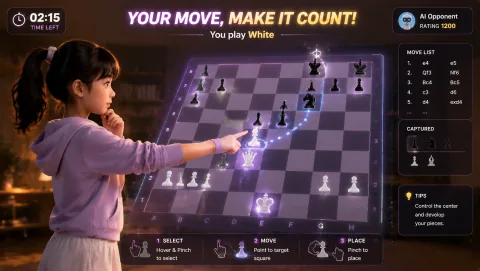
Gesture Chess
Move chess pieces by pinching over the board and play against the AI. The decision comes before the gesture.
Controls: Aim at a piece, pinch to select, aim at its destination and pinch again.
First-round idea: Select and place a legal piece move with a steady hand.
Pro · sign-in required

Cyber Knot
Pull neon loops apart until the tangle becomes readable. Each move changes the puzzle.
Controls: Open your fingers, hover over a node, pinch to grab, drag and open to release.
First-round idea: Separate an outside loop before working into the center.
Pro · sign-in required

Bubble Match
Connect bubbles of the same color with your hand positions; a wrong color breaks the chain.
Controls: Point or reach to one bubble, then another of the same color.
First-round idea: Complete a color match before extending the chain.
Pro · sign-in required