Mid-Air Games and MovePlay both offer browser webcam play, but they suit different first-game choices and access expectations. Mid-Air emphasises a small hand/face-controlled selection without an account. MovePlay includes hand, head and full-body controls; its paid live games require sign-in and Pro, alongside a current free selection. Compare the actual action and access rule before opening a game.
Product details were checked on 8 October 2026. This is a published-feature comparison, not a side-by-side device performance test. Availability and policies can change.
Compare the decision, not just the camera
| Question | Mid-Air Games | MovePlay |
|---|---|---|
| How do I start? | The site currently describes free browser play without an account. | Check the current free selection; paid games require sign-in and Pro. |
| What movements are central? | Hand and face input; its catalog also identifies mouse options for selected games. | Game-specific hand, head, reaching, stepping, jogging and other body controls. |
| What should I verify? | The selected game’s gesture, player mode and device guidance. | The selected game’s tutorial, floor footprint, camera framing and access label. |
| Can I assume mobile support? | No; follow the product’s current device guidance. | No universal device guarantee; test the actual browser and game. |
| Is camera privacy the entire data policy? | Read its own privacy notice and analytics choices. | Separate camera frames from account, analytics, session and sharing data. |
Mid-Air’s access and control descriptions above come from its official website. We have not verified them by playing every mode or auditing its network. MovePlay’s access labels below are generated from the current live catalog and free-game configuration.
Choose Mid-Air when the narrower first step fits
A person who wants to try a hand/face-controlled browser challenge before creating an account should check Mid-Air’s selection and instructions. A small selection can be an advantage when the decision is “show me one gesture that works”. Verify the chosen mode rather than assuming all games support the same inputs or player count.
This does not make it a replacement for a guided workout, dedicated TV console or school-approved service. Those decisions involve different costs, content, accounts and operational requirements. A public product page alone does not establish school privacy compliance or reliability on a managed device.
Choose MovePlay when the control variety matters
If you want a pinch-led chess move, a hand puzzle, head aiming or a full-body campaign, browse by actual controls. Start with hand-tracking games, no-jumping choices or sports-themed movements. Read the access label before entering a paid game.
Different controls also change setup. Jogging and overhead actions need more clearance than a visible hand near a desk. MovePlay’s browser delivery is not a promise of universal mobile support, simultaneous family multiplayer or a free entire catalog. Use the current catalog and current plans to make that decision.
Use the same practical trial for either product
- Choose one game whose action fits the room and participant.
- Check account/access terms before starting, then read the camera and data policy.
- Place the running device securely with front lighting and a visible movement area.
- Learn one gesture and confirm its feedback before comparing scores.
- Complete a turn, then decide whether the controls, setup and access model justify another one.
Do not compare frame rate, latency, detection accuracy or energy use from this article; no controlled benchmark was performed. For MovePlay, the setup guide and privacy explanation are the appropriate next steps. A family can take turns in a single-player game, but that should be described as turn-taking rather than a new native multiplayer mode.
MovePlay is an independent service. Third-party names identify the products being compared; this guide does not imply their endorsement or an affiliation. Check the linked provider’s current offer before buying.
Games to preview
Review the controls, play area and access label before opening a game.
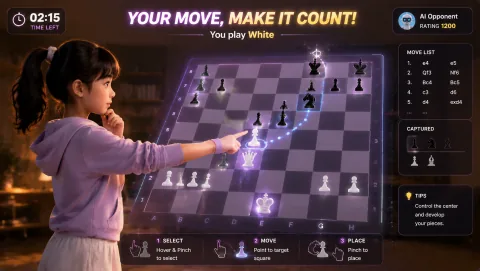
Gesture Chess
Move chess pieces by pinching over the board and play against the AI. The decision comes before the gesture.
Controls: Aim at a piece, pinch to select, aim at its destination and pinch again.
First-round idea: Select and place a legal piece move with a steady hand.
Pro · sign-in required

Laser Eyes
Aim lasers with head orientation and protect the cat from approaching monsters.
Controls: Turn your head to aim; keep the face visible.
First-round idea: Track a monster while keeping the cat out of the firing line.
Pro · sign-in required
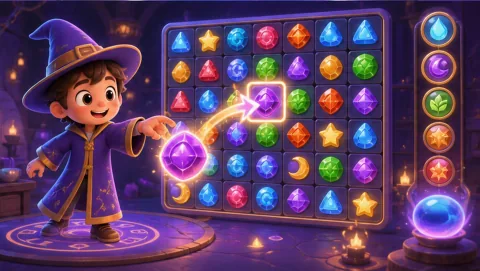
Magic Match
Pinch a rune, swap it with a neighbor and build match-three cascades toward the displayed collection goal.
Controls: Pinch to grab, drag to an adjacent cell and release.
First-round idea: Make a match of three and collect a target rune.
Pro · sign-in required