Quieter movement games start with reduced floor impact, then control music, voices and device sound separately. “No jumping” does not guarantee silence: quick steps can still transmit sound, a loud game can disturb a shared room, and arm movements need clearance. For an apartment, upstairs classroom or office, choose a hand-led or small head-led control before a full-body challenge.
A noise check that is more useful than a “quiet” label
| Noise source | Choice to consider | Limit |
|---|---|---|
| Foot impact through a floor | Hand puzzle or head aiming while stationary | No guarantee for a particular building or floor. |
| Music and effects | Lower volume or a suitable personal audio setup | Make sure important game cues remain understandable. |
| Excited voices | Cooperative turns or a visible silent signal | Game controls do not regulate the group’s behaviour. |
| Desk/device movement | A stable surface and clear cable path | Do not grip or move the laptop during a gesture. |
Three camera-game controls without a jump command
GestureChess: move a visible hand over the board and use a pinch to confirm a move against the AI. The challenge is choosing a move and confirming it clearly, not moving the whole body quickly. Keep the hand within the camera frame and start with a short practice.
CyberKnot: activate a loop and drag it to separate the tangle. It suits a hand-led puzzle choice, but the hand still needs room to move and the camera still needs lighting.
LaserEyes: use small head turns to aim and sustain aim on a target. Its name does not mean measured eye-gaze tracking. Choose it only if that head movement feels suitable; a hand game may be the better alternative.
These choices are not certified accessible or safe for every participant. Review the no-jumping collection and hand controls for the actual mechanics. Smaller movement, lower noise and seated play are related constraints, not interchangeable labels.
Offline quiet games for a shared room
- Silent mirror: one person makes three small hand shapes; the other copies, then leads. Keep each movement within a comfortable personal area.
- Gesture sequence: build an open-palm, point and closed-hand pattern. After an error, rebuild together instead of shouting a penalty.
- Direction detective: a leader points to a left or right cue while the partner responds with a hand sign. Reverse the agreed rule for a thinking challenge, rather than adding speed.
No camera, account or music is required for these human-led activities. They are useful when privacy, school policy or noise makes digital play a poor fit. In a classroom, GoNoodle’s recommendations also include a no-stomping video category; a follow-along may fit a whole class better than one tracked player.
Try one complete turn before promising a quiet session
Agree on the sound limit, preview the input, then have one willing person try a round. Check whether the player needs to lean into furniture, whether spectators are creeping into the frame, and whether game audio can be heard where it should not be. Move to an offline choice if the setup conflicts with the room.
A mat does not prove that neighbours will not hear you. Nor does a small room automatically make a stationary game appropriate. Use the movement-footprint check, then choose by what the person actually does. The cards below show real live games and their current free/Pro access rather than a promise of a free silent catalog.
Games to preview
Review the controls, play area and access label before opening a game.
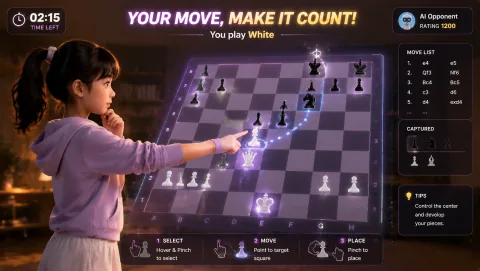
Gesture Chess
Move chess pieces by pinching over the board and play against the AI. The decision comes before the gesture.
Controls: Aim at a piece, pinch to select, aim at its destination and pinch again.
First-round idea: Select and place a legal piece move with a steady hand.
Pro · sign-in required
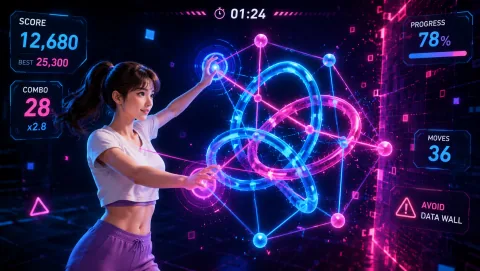
Cyber Knot
Pull neon loops apart until the tangle becomes readable. Each move changes the puzzle.
Controls: Open your fingers, hover over a node, pinch to grab, drag and open to release.
First-round idea: Separate an outside loop before working into the center.
Pro · sign-in required
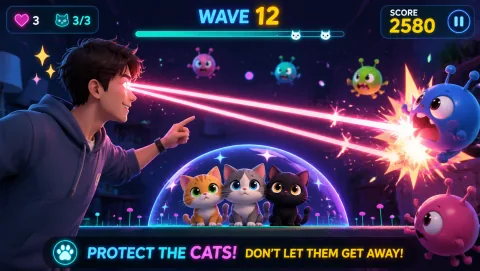
Laser Eyes
Aim lasers with head orientation and protect the cat from approaching monsters.
Controls: Turn your head to aim; keep the face visible.
First-round idea: Track a monster while keeping the cat out of the firing line.
Pro · sign-in required