An untangle puzzle asks you to change a drawing until its connecting lines no longer cross. In Cyber Knot, you do that with your hands: hover near a node, pinch to grab it, move it and open your fingers to release. The game checks the line crossings; a bright, readable shape alone is not the goal.
Understand the puzzle before grabbing
Look at one crossing and trace both lines back to their endpoints. Moving an endpoint changes every line attached to it, so a move that fixes one crossing may create another. Begin with an outside node whose connected lines you can follow. The suggestion to start outside is a practice method, not a guaranteed solution for every board.
Make one clean grab–move–release sequence
- Show an open hand to the camera before reaching for a node. Keep your fingertips visible.
- Move the hand cursor close to the node and check the hover feedback. Hover chooses the target; it does not start the drag.
- Pinch after the node is targeted, then move your hand to reposition it.
- Open your fingers to release. Inspect the connected lines before selecting the next node.
Approaching a node while already pinching can fail to grab it: this game requires a fresh open-to-pinch transition. After a release or a hand leaving the frame, show open fingers again before attempting the next grab.
Compare a move by the crossings it changes
| What you notice | What to try | What to inspect afterward |
|---|---|---|
| A node is buried near the middle | Move it toward a clearer outside area | Every line connected to that node, not just the shortest one |
| One crossing disappears but another appears | Compare a different endpoint or position | Whether the overall crossing pattern became simpler |
| The cursor reaches a node but it stays still | Open the hand, establish hover, then pinch | Selection feedback before judging the puzzle move |
A first-round challenge you can explain
Choose a crossing, say which endpoint you intend to move, and make only that move. Explain what changed. Repeat until you understand the relationship between a node and its lines. The actual completion condition is no crossings; this smaller challenge is an optional way to learn, not an extra in-game mode.
For shared play, an observer can propose a move while one person operates the camera input. Swap after a move or puzzle. This is informal turn-taking, not simultaneous multiplayer.
When the hand input gets in the way
Keep the hand away from the edge of the preview and avoid covering the fingertips with your other hand. Separate a tracking problem from a puzzle problem: first confirm the cursor and grab respond, then assess whether the move untangles anything. Use the camera setup guide for framing and light, or compare the input types in the hand-tracking guide.
Choose the next kind of puzzle
For a different spatial problem, read the Bus Queue route-planning guide. For a board-wide merge decision, try the Merge 2048 guide. Return to puzzle and casual game choices to compare controls before opening a title.
Games to preview
Review the controls, play area and access label before opening a game.
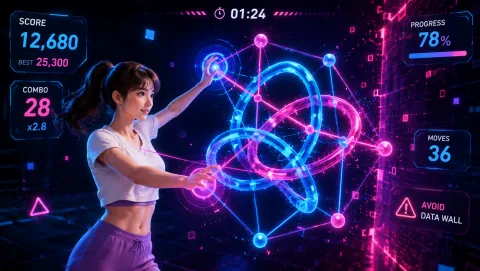
Cyber Knot
Pull neon loops apart until the tangle becomes readable. Each move changes the puzzle.
Controls: Open your fingers, hover over a node, pinch to grab, drag and open to release.
First-round idea: Separate an outside loop before working into the center.
Pro · sign-in required