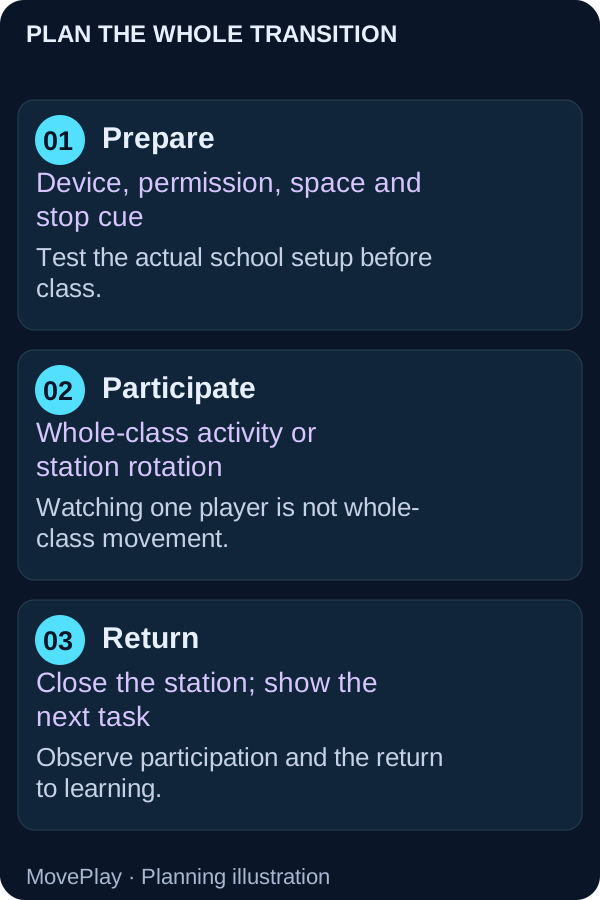
The class has been sitting for a while. You want a change of pace, but you also need everyone ready for the next task. A successful movement break has two jobs: create an activity opportunity and make the return to learning straightforward.
A webcam game can be one part of that plan. With one camera station, however, only the active player may be moving. A room watching a screen is not automatically a whole-class activity break.
What classroom activity research supports
The CDC describes classroom activity as movement integrated into instruction or breaks, with potential benefits for participation and classroom behavior. It is an addition to PE, not a replacement.
A systematic review and meta-analysis of classroom activity found favorable on-task behavior results, while academic outcomes depended on how they were measured. A later review of attention and on-task behavior also found a broadly beneficial signal. These studies involved varied classroom activities; they do not demonstrate that a particular webcam title improves grades.
For your first session, observe whether students participate and how smoothly they return to the next task. That tells you more about the fit of the activity than a game score.
Choose between a whole-class break and a station
| Format | Who moves? | Good use |
|---|---|---|
| Teacher-led offline break | The class participates within their own space | A quick transition without device setup |
| Supervised camera station | One player at a time | Small groups or a rotation with other activities |
| Shared decision task | One input player; others can discuss | Prediction and rule explanation, not whole-class exercise |
Do not ask students to copy fast game movements from their desks unless you have separately chosen a suitable whole-class action and checked clearance. The camera game’s control instructions apply to the person in the play zone.
A rehearsal plan before students arrive
- Open the game on the actual school device and network. Confirm camera permission and current access.
- Read the tutorial and try a complete turn, including restart and sound controls.
- Mark where the player and waiting group belong. Check cables and arm clearance.
- Choose the stop cue and demonstrate how to step away from the station.
- Prepare an offline alternative for a blocked device or a student who prefers not to use a camera.
The school permission guide helps distinguish a browser prompt from a managed-device restriction. Follow your school’s approval and privacy processes before introducing account or camera use.
Keep the game goal understandable
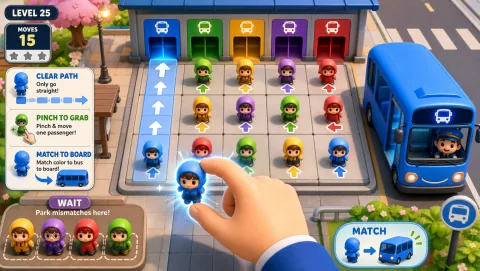
Reaction can provide a visible target-selection task. Explain the control before asking a student to respond quickly. Bus Queue offers a different kind of turn: pause, predict an exit path and discuss a routing choice. A thoughtful puzzle turn is useful shared participation, but does not have the same movement purpose as an active break.
Give waiting students a genuine role if the purpose is discussion: predict the next move, explain a rule or notice a successful choice. If the purpose is more movement, place the game within a station rotation that also includes suitable offline activities.
End with the next task already prepared
Use one consistent stop signal, close the camera session and direct attention to a visible instruction. “When the station closes, collect your worksheet and begin question one” is clearer than hoping the excitement will settle by itself. Ask students what helped them return, and adjust the next session.
Record participation and transition observations without creating a public ranking. Game results are not learning assessments. Avoid posting identifiable student images or result cards as a condition of participation.
Choose the next classroom resource
Use the teacher setup guide for account and privacy decisions, the indoor activity plan for offline options. Choose a puzzle when the aim is a discussion-led task. The games below are examples to preview, with their current access shown; select by the action your session needs.
Sources and further reading
- Classroom Physical Activity (2024) — CDC practice guidance.
- Effect of classroom-based physical activity interventions on academic and physical activity outcomes: a systematic review and meta-analysis (2017) — Systematic review and meta-analysis.
- Effect of classroom-based physical activity interventions on attention and on-task behavior in schoolchildren: A systematic review (2022) — Systematic review.
Games to preview
Review the controls, play area and access label before opening a game.

Reaction
Read scattered numbers and reach them in order as the time window shrinks.
Controls: Reach numbered targets with hands and feet.
First-round idea: Finish a number sequence in the correct order.
Pro · sign-in required
Bus Queue
Clear a passenger path and use limited waiting space to get riders onto matching buses.
Controls: Pinch a glowing passenger, drag to the matching bus or waiting zone, release.
First-round idea: Board a matching rider without filling the waiting zone.
Pro · sign-in required