Start with four constraints
That is why a hand-led game can fit beside a desk while a repeated side-step or jumping game may not fit the same floor area safely.
Small-space movement
A small room can work for webcam motion games when the selected control stays inside a predictable zone. The useful question is not “How many square metres is the room?” but how far the player must travel, what body parts the camera must see, how much noise the movement creates and what happens when the player misses a target.
Updated August 30, 2026 · Editorial guide based on the current MovePlay game controls

Best for apartments, dorm rooms, bedrooms, hotel rooms, classrooms, and any play area where furniture or neighbors set the rules.
That is why a hand-led game can fit beside a desk while a repeated side-step or jumping game may not fit the same floor area safely.
Estimate the largest movement the game asks for, not the average movement.
Check whether the player needs to:
A safe-looking idle pose is irrelevant if the game encourages the player to lunge toward furniture once the score gets close.
The camera must still see the body area used by the controls at the edge of the movement.
Put the device in its final position and test the widest required movement. If wrists or ankles disappear during the motion, move the camera, increase distance or choose a control style that needs less body coverage.
Do not keep asking the player to “move bigger” when the actual problem is framing.
A game can fit physically and still be a poor apartment choice.
Repeated jumping, hard landings and fast footwork may be inappropriate when there are downstairs neighbours, sleeping family members or a hard floor. A quiet small-space session usually works better with:
The movement zone should not overlap with:
The room does not have to be empty. It does need a clearly understood play boundary.
The exact classification should be generated from current game metadata, but the selection logic should look like this:
| Control style | Typical travel | Camera need | Noise | Good starting context |
|---|---|---|---|---|
| Palm / pointing | Very low | Hands or upper body | Low | Desk, bedroom, shared room |
| Head / gaze | Very low | Head and shoulders | Low | Tight spaces, seated play |
| Lean / torso steer | Low | Upper body | Low | Apartment, office break |
| Reach / swat | Low–medium | Arms and torso | Low | Living room, classroom station |
| Squat / knee lift | Low travel but more vertical range | Often most of body | Medium | Clear standing zone |
| Side-step / dodge | Medium | Wider body framing | Medium | Cleared room |
| Jump / run-style | Medium–high | Full body | Higher | Larger clear zone |
This is more useful than labeling an entire game “small-space” without explaining why.
Always verify the current controls, but these live titles illustrate lower-travel design:
For a more active option, a reach-and-react title such as Whack A Mole can work if the arm space is clear and the targets do not encourage large lunges.
The live Small-Space Games collection (/collections/small-space-games/) should be the maintained product list because controls and availability can change.
A contained game can still feel active. The design goal is to keep movement predictable, not eliminate it.
For example, a squat keeps the feet in roughly the same place but needs vertical body clearance and stable footing. A hand-swiping game can create fast upper-body movement with almost no floor travel. A leaning game can challenge timing without requiring a jump.
This is why movement taxonomy belongs in the game metadata and collection filters.
Prioritise:
Use the No-Jumping Games collection (/collections/no-jumping-games/) as a second filter.
Camera placement is often the limiting factor. A laptop on a low bed may point upward and lose the lower body. A desk may be too close to show a full-body control.
If the room cannot create a useful full-body camera angle, prefer hand, head or upper-body games rather than stacking the laptop on an unstable object.
“Small space” may mean many people share the room, not that the room itself is physically small. Use one marked player zone, keep spectators out of the camera area and give waiting participants a non-camera role.
For classroom workflows, use Classroom & PE Games (/collections/classroom-pe-games/) and the brain break guide (/guides/brain-break-games).
Use the Small-Space Games collection (/collections/small-space-games/) to choose a control style, then run the three-minute room test before the first full session.
Choose by constraint
These are practical starting points based on each game’s actual control style. Test the camera and room before extending the session.
| Your situation | Start with | Why it fits |
|---|---|---|
| A chair or desk must stay in place | Laser Eyes or Snake | Both keep the player near one marked position and avoid wide floor travel. |
| I can stand but cannot jump | Snow Trail or Whack A Mole | Leaning and reaching create readable motion without requiring a large run-up. |
| The room is shared or noise-sensitive | Cyber Knot or Gesture Chess | Hand-led play keeps sound and movement more contained; the camera frame still needs checking. |
Practical playbook
Keep the first session small, specific, and easy to stop. The goal is not to create a perfect workout. The goal is to make active play feel like a normal option.
Begin with a single short small-space webcam games round to test the real setup: camera position, lighting, and floor space before inviting a group.
Let the first player choose the opening game, then rotate so everyone gets a turn shaping the session.
Track completion, not perfection: one round finished is already a useful data point.
Why it works
Space, posture, noise, camera framing, and stopping distance all matter. A “best game” list without those constraints is not very useful to someone in a real apartment.
Webcam play depends on a readable frame, reasonable light, and permission to use the camera. Test the exact room rather than assuming a device specification guarantees a good experience.
One floor mark, one stop signal, and one alternative make small-space play easier to explain and safer to pause.
Sources and limits
These links provide background for the guidance above. They do not turn a MovePlay game into a clinical assessment or guarantee a particular health, learning, or relationship outcome.
Start here
These games are browser-based and use body movement through a webcam. No controller or download required.
Laser Eyes
Micro-turn your head to aim, hold your gaze to fire lasers — eliminate monsters without hitting the cat.
02
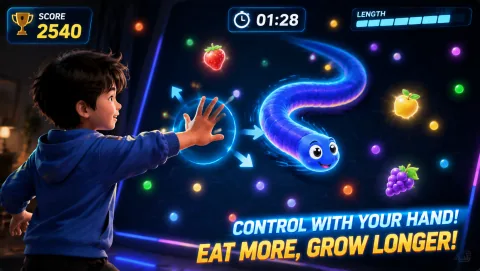 Snake
Guide the snake with your palm position — the longer it grows, the harder it is to turn.
03
Snake
Guide the snake with your palm position — the longer it grows, the harder it is to turn.
03
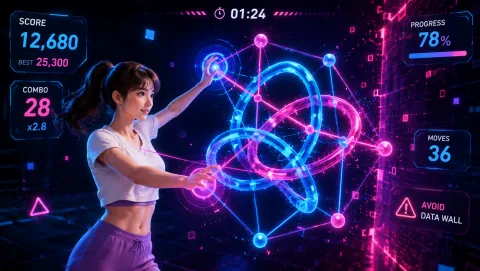 Cyber Knot
Untangle neon data coils — one wrong move and the data stream explodes.
04
Cyber Knot
Untangle neon data coils — one wrong move and the data stream explodes.
04
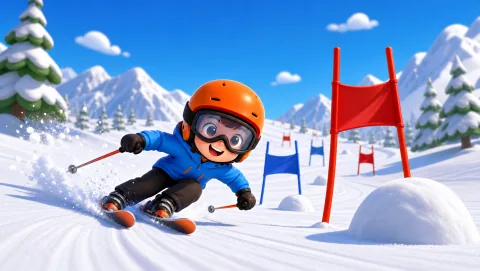 Snow Trail
Lean your body to steer, pass through gates, squat to accelerate. Feel the flow of the ski slope!
Snow Trail
Lean your body to steer, pass through gates, squat to accelerate. Feel the flow of the ski slope!
Simple routine
Before starting a longer session:
More options
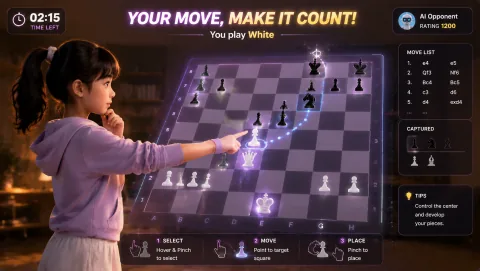 Gesture Chess
Pinch gestures command the pieces — face the AI in a peak showdown and surrender anytime.
06
Gesture Chess
Pinch gestures command the pieces — face the AI in a peak showdown and surrender anytime.
06
 Whack A Mole
Moles pop up — smash them hard. Miss one and the rhythm spirals out of control.
07
Whack A Mole
Moles pop up — smash them hard. Miss one and the rhythm spirals out of control.
07
 Reaction
4 numbers scatter to the corners — slap them in order with hands and feet. The timer shortens fast; slow reactions cost points.
Reaction
4 numbers scatter to the corners — slap them in order with hands and feet. The timer shortens fast; slow reactions cost points.
Keep it realistic
Do not use a small room as permission to move faster or jump higher. Keep a clear route to stop, avoid slippery surfaces, and choose seated or contained play when the floor cannot be cleared. Stop for pain, dizziness, or discomfort.
Common questions
There is no single number. Full-body games often need roughly 1.5–2 metres of camera distance plus clear movement space, while hand- or head-led games may work much closer. Use the selected game’s movement and camera framing as the deciding factors.
Yes. Many motion controls can use hands, arms, head movement, leaning, squats or other non-jumping input. Browse the no-jumping collection.
Yes. Fast reaching, arm swipes, controlled squats and leaning can create active play without repeated foot impact. “Active” and “high impact” are not the same thing.
Choose a game that only needs the visible region, or reposition the camera safely. Do not place the device on an unstable stack just to force full-body framing.
Move first, scroll later
Aim lasers with head orientation and protect the cat from approaching monsters.
Controls: Turn your head to aim; keep the face visible.
First-round idea: Track a monster while keeping the cat out of the firing line.
Pro · sign-in required
Steer a growing snake with your palm and plan turns before its longer tail closes the route.
Controls: Move a visible palm to steer.
First-round idea: Collect food, then leave space for the next turn.
Pro · sign-in required
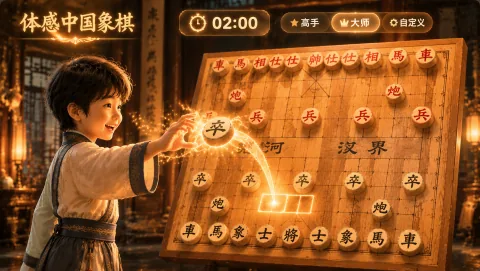
Command a Xiangqi board with pinch-and-drag moves and face the AI across the river.
Controls: Pinch a piece, drag to the target intersection and release.
First-round idea: Make a legal opening move, then read the AI response.
Pro · sign-in required