Webcam games for tweens

Webcam games for tweens

Ages 9 to 12 are the in-between years — too old for little-kid activities, too young to be left to a screen all afternoon. Webcam motion games hit the gap: real scores to chase with friends, sleepover-ready party formats, and screen time a parent can actually approve of.

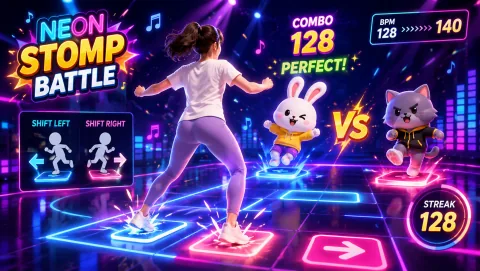
Neon Stomp Battle gameplay preview
Neon Stomp Battle Side-step to the beat as the BPM ramps up. It looks like a rhythm game and plays like a dance battle — the natural centerpiece of a tween sleepover bracket.
Best for

Best for parents of 9–12 year olds who want active screen time that survives the "that's for little kids" test — after-school play, friend hangouts, and sleepover or birthday party entertainment on one laptop.

01

Score Challenges Between Friends

Tweens compete on numbers, not on "who danced best." Pick one reflex game, have each friend play three rounds back to back, and keep the best score on a note on the fridge. The challenge survives the hangout — the next visit starts with "I practiced, let me show you." Asynchronous rivalry like this needs no accounts and no online play, just one shared high score to chase.

02

Sleepover Tournament Night

A webcam game tournament solves the classic sleepover problem of one device and four kids who all want a turn. Hot-seat rotation keeps everyone engaged: the player on camera performs, the rest heckle, coach, and wait for their bracket slot. Because rounds run 60 to 90 seconds, nobody waits long — and the physical effort burns off the exact energy that would otherwise become midnight chaos.

03

The After-School Reset

The hour between school and homework is when tweens most want to flop onto a screen. A short motion game session is a compromise both sides can live with: they get game time, you get movement before the sit-down evening starts. Keep it to 15–20 minutes and let them pick the game — ownership of the choice is the whole trick at this age.

Sleepover and party formats

Four kids, one laptop, zero boredom

Group formats matter more than game choice at a sleepover. These three structures keep a room of tweens rotating, watching, and laughing without anyone drifting off to a phone in the corner.

For parents

Screen time you can say yes to

The 9–12 years are when screen-time negotiations start in earnest. Webcam motion games are a useful middle ground in that negotiation — they're real games with real scores, but the input is the player's body, not a thumb on a screen.

Why this age works

Built for the transition years

Nine to twelve year olds are a genuinely different audience from both younger kids and teens. The formats that work for them respect three things about where they are.

Scores beat praise

A tween doesn't want to be told "good job moving" — they want a number that's theirs. Reflex and rhythm games produce exactly that: a measurable result from physical effort, which is what makes active play self-motivating at this age instead of parent-enforced.

Self-consciousness is real

Many tweens will not dance on command in front of adults. But put them on camera in a game with a friend group, where everyone looks equally ridiculous and the score is what counts, and the self-consciousness disappears. Group formats first, solo play once they're hooked.

No strangers, no signups

This is the age kids first push for online games with chat and accounts. Browser webcam games offer a parallel track: genuinely challenging gameplay with no accounts, no downloads, and no contact with strangers — which makes them one of the easier yeses in a parent's vocabulary.

Quieter picks

For the wind-down hour

Browse all free games in the MovePlay game hub, check the reaction games collection for more score-chasers, or run the reaction time test to give friends a number to argue about before the games even start.

House rules that work

Three agreements before the first round

  1. One player, one camera: whoever's on camera plays; everyone else's job is watching, coaching, and keeping score. Two kids crowding the camera ruins the tracking and starts arguments — the rotation is the rule.
  2. Scores get written down: paper on the table, names and numbers, visible to everyone. A written scoreboard turns scattered rounds into a tournament, and it's what makes the rematch happen next time.
  3. The host picks the stopping point: agree before guests arrive when game time ends — after the final bracket match, or at a set hour. Ending on a finished bracket feels like a natural close; ending mid-round feels like a punishment.

Room setup

Space and camera notes

Clear a play patch about two arm-spans wide in front of the laptop — basements and living rooms beat bedrooms for group play. Move the coffee table, check for ceiling-fan clearance before any jumping game, and keep spectators on the couch side of the room so nobody drifts into the play space mid-round. For a bigger audience view, connect the laptop to a TV so the crowd watches the screen while the player faces the camera.

Questions parents ask

FAQ

Are webcam games a good fit for 9 to 12 year olds?

Yes — this age group is actually the sweet spot. Tweens are old enough to read game rules themselves, care about beating real scores, and have the coordination for full-body games, but most still enjoy silly, physical play when friends are involved. Browser webcam games also avoid the two things parents worry about most at this age: there are no downloads, no accounts, and no chat with strangers.

How do I set up a webcam game tournament for a sleepover?

Keep it hot-seat style: one laptop, one player on camera at a time, everyone else watching and coaching. Write a simple bracket on paper, give each player 60 to 90 seconds per round, and record scores as you go. Short reflex rounds rotate players fastest — a six-player bracket finishes in about 20 minutes. End with a final where the top two scores face off in the game the group liked most.

My tween says webcam games are for little kids. How do I sell it?

Don't sell it as exercise — sell it as a score to beat. Tweens who would roll their eyes at a kids' movement video will happily grind a reflex game for 20 minutes trying to top a friend's number. Start with the hardest, fastest games rather than the cutest ones, let them fail a few rounds, and leave the room. Ownership of the challenge is what makes it land with this age group.

How long should a tween play motion games in one session?

For solo after-school play, 15 to 30 minutes is a natural arc — most players stop on their own once a game stops improving their score. For group play like sleepovers, plan 45 to 60 minutes across several games with snack breaks between brackets. Because these games involve real physical movement, players tire in a way passive gaming never produces, which makes session limits easier to hold.

Do I need to buy anything for webcam motion games?

No. MovePlay games run in a standard browser on any laptop with a built-in webcam — no console, no controllers, no downloads, and no signup. If you want a bigger screen for a group, connect the laptop to a TV with an HDMI cable so everyone can see the action while one person plays on camera.
MovePlay — Free Webcam Motion Games

Give them a score to beat, not a screen to sink into.

Play Neon Stomp Battle free