Start with a game whose goal you can explain together: get a passenger to the matching bus, swap a rune, or copy a shape. Let your child explore one control before worrying about scores. An adult can help with permissions and deciding whether the movement fits the room.
Choose by rules and movement
| Interest | Example | What to preview together |
|---|---|---|
| Planning a route | Bus Queue | Facing direction, a clear path and pinch–drag–release |
| Matching pictures | Magic Match | The rune swap and hand visibility |
| Copying a shape | AwkwardPoseStudio | The pose, timer and full-body space |
Choose a different game when the rules or required action are frustrating. This is not an age-based suitability certification: familiarity, comfort and access to the controls vary between children.
Take turns without turning it into a test
Keep one active player in the camera frame. An observer can suggest a bus route or describe the next move, then swap roles. Celebrate a clear first action—a correctly boarded rider or a successful swap—instead of comparing unrelated games' scores. See the family turn plan for a simple shared format.
Camera, privacy and access
Preview the whole movement with an adult and clear its space. Movement-tracking camera input is processed on the device; accounts, analytics, purchases, session data and sharing are separate. Read the camera explanation and privacy policy before choosing account or sharing features.
Current free selections and Pro games have different access rules. Read the labels before opening a game. This page does not certify compliance with children's privacy laws or grant a school licence; schools should assess their permissions and safeguarding requirements.
When you need another option
Use camera setup if the control does not respond. For a camera-free activity, try the indoor activity guide. For a puzzle-led session, read puzzle and casual choices.
Research-informed next steps
Make the first invitation playful.
Games to preview
Review the controls, play area and access label before opening a game.
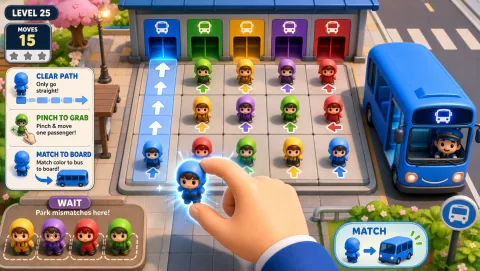
Bus Queue
Clear a passenger path and use limited waiting space to get riders onto matching buses.
Controls: Pinch a glowing passenger, drag to the matching bus or waiting zone, release.
First-round idea: Board a matching rider without filling the waiting zone.
Pro · sign-in required
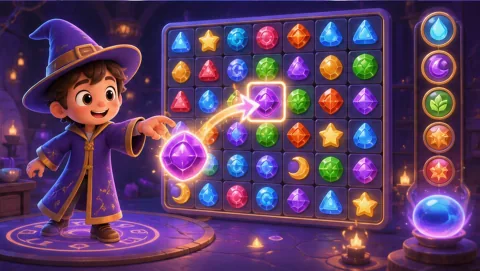
Magic Match
Pinch a rune, swap it with a neighbor and build match-three cascades toward the displayed collection goal.
Controls: Pinch to grab, drag to an adjacent cell and release.
First-round idea: Make a match of three and collect a target rune.
Pro · sign-in required