Passive screen time
The body is still and the screen does the work: watching videos, scrolling, tapping through a show. The content plays whether the child moves or not, and stopping is the hardest part.
Family guide
The same screen, a different deal: instead of sitting still and watching, kids stand up and play. In active screen time games, the body is the controller — movement is what changes what happens on screen.
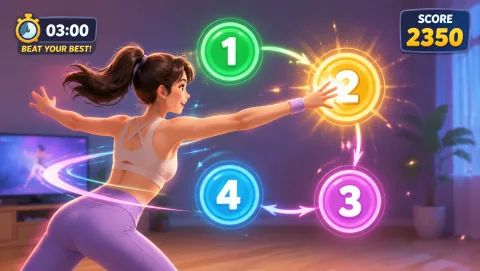
Families who want screen minutes to involve real movement — kids aged 4–12, one laptop or Chromebook, and about 2 meters of clear floor. Everything here is free and runs in the browser.
The idea
The body is still and the screen does the work: watching videos, scrolling, tapping through a show. The content plays whether the child moves or not, and stopping is the hardest part.
The screen becomes the playground. The game only moves when the player moves — reach to pop a bubble, squat to dodge a ghost, pose to snap the photo. Movement is the input, not a break from the input.
An active round is physical, has a clear beginning and end, and is easy to share by taking turns. It turns "how long have you been on that screen?" into a game the family plays together.
Passive viewing tends to look the same from the outside. Active play is legible: you can watch your child duck, lunge, and laugh, and you can join the next round. The screen stops being a wall between you and what they are doing.
In these games, standing still is how you lose. Scoring well in Reaction or SquatPacman means moving quickly and often — the fun and the movement are the same thing, so there is no coaxing required.
Rounds last one to five minutes, so siblings and parents swap in naturally. Turn-taking keeps sessions short, gives everyone breathers, and turns screen time into something the family does in the same room.
Family rhythm
There is no single right number — the honest answer is that your family's routine and your pediatrician's guidance come first. What most families find easier than counting minutes is building a rhythm around rounds.
Active first: make movement the entry fee — a couple of active game rounds come before any passive viewing, so the two never blur together.
One round as a transition: a single 5-minute round of BubbleMatch or WhackAMole works as a bridge between homework and dinner, or as a wake-up on weekend mornings.
Agree the end point up front: "three rounds each" is easier to stick to than a timer on an open-ended session, because rounds end on their own.
Keep it in the mix: active games sit alongside outdoor play, reading, and offline time — they are one good option in the rotation, not the whole plan.
Start with obvious, one-movement games — WhackAMole and BubbleMatch need no reading and reward any reach. Stay in the room, start each round for them, and swap players often.
Kids this age can launch rounds, follow on-screen prompts, and manage their own turn-taking. SquatPacman and AwkwardPoseStudio are strong picks from around age 8.
A laptop webcam is enough — Chromebooks included. Clear about 2 meters between the player and the screen, face a window or lamp for even light, and use a non-slip floor.
Privacy
MovePlay games ask for camera access so the browser can detect movement — that processing happens locally on your device, in the browser session. There is no sign-up, no player profile, and nothing to install. When the tab closes, the session is over. As with any physical play, clear furniture edges and supervise younger children.
The starter five
A mix of movement types and ages, from calm two-hand coordination to full-body squatting. Each round is short, self-contained, and free to play right now.
Reaction
Slap numbered targets in order with hands and feet as the timer shrinks.
Age 6+ · Whole-body reflexes · ~2 min · Turn-taking
02
 BubbleMatch
Match colored bubbles with one hand at a time — a gentler round that works seated.
Age 4+ · Two-hand coordination · 2–3 min · Calm pace
03
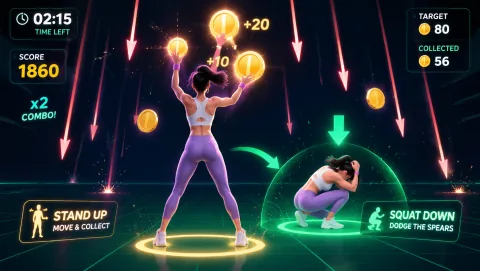 SquatPacman
Squat to dodge ghosts and steer through a maze your legs control.
Age 8+ · Squat cardio · 2–4 min · Turn-taking
04
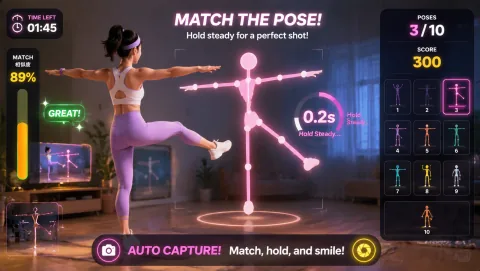 AwkwardPoseStudio
Copy a silly body silhouette before the 3-second timer snaps the photo.
Age 5+ · Pose matching · 1–2 min · Family favorite
05
 WhackAMole
Reach out and tap moles as they pop up around the screen before they duck back down.
Age 4+ · Reach-and-tap reflexes · 1–2 min · Easiest start
The plan
Ten to twenty minutes a day, built around short rounds and turn-taking. Swap days freely — the shape matters more than the schedule: something active, a clear end, someone else taking the next turn.
| Day | Activity | Time |
|---|---|---|
| Monday | After-school reset: three rounds of WhackAMole, youngest player first. | 10 min |
| Tuesday | Two-hand focus: BubbleMatch before any evening viewing. | 10 min |
| Wednesday | Whole-body Wednesday: two rounds of Reaction each. | 15 min |
| Thursday | Photo night: AwkwardPoseStudio — parents join, silliest pose wins. | 10 min |
| Friday | Leg day for kids: SquatPacman high-score contest. | 15 min |
| Saturday | Family tournament: everyone plays one round of each game, keep a simple scoreboard. | 20 min |
| Sunday | Calm close: one gentle BubbleMatch round, then screens off for the evening. | 10 min |
Questions parents ask
Not all screen time is the same. What a child does in front of the screen — and how their body is positioned while doing it — changes the picture. Sitting still to watch videos is a different experience from standing up and playing a game that only advances when you jump, reach, or squat. Active screen time does not replace outdoor play or offline activities, but it changes the equation for the minutes a family does spend on screens.
There is no single rule that fits every family or every child. Pediatric guidance in your country and your child's age, temperament, and routine matter more than any number on a website. What works well in practice is a rhythm rather than a quota — for example, one or two short active game rounds (5–10 minutes each) before any passive viewing, agreed in advance so the end point is clear.
Simple reach-and-tap games like WhackAMole and BubbleMatch work from around age 4 with a parent nearby. From about age 7, most kids can start rounds, read on-screen prompts, and take turns independently. More physically demanding games like SquatPacman suit ages 8 and up.
No. A laptop, Chromebook, or desktop with a built-in webcam and a Chrome browser is enough. Clear roughly 2 meters of space between the player and the screen, use a non-slip floor, and you are ready. There are no controllers, sensors, wearables, downloads, or accounts.
Yes — and it usually works better that way. Games are single-player, so families take turns, which naturally keeps rounds short and gives everyone a rest. AwkwardPoseStudio is a particular favorite for mixed ages, because posing for the camera is just as funny for adults as for kids.
MovePlay — Free Webcam Motion Games
Reach moles before they disappear and keep the next target in view.
Controls: Reach or lean toward the mole positions.
First-round idea: Hit the next visible mole without rushing the return to center.
Pro · sign-in required