Webcam party games

Webcam party games

Party games that run on one laptop and one camera — guests take turns in front of the screen while the rest of the room plays along from the couch. No controllers to pass around, no app to install on six phones.

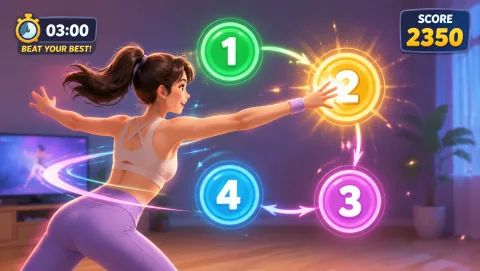
Neon Stomp Battle gameplay preview
Neon Stomp Battle Beat markers scroll in time with the music — side-step and shift your weight to match. The BPM climbs as the round goes on, which is exactly when the crowd starts chanting.
Best for

Best for hosts running a house party, birthday, or game night for 6 to 15 people, with a laptop, a TV or projector, and one open patch of living-room floor.

01

The Arrival Icebreaker

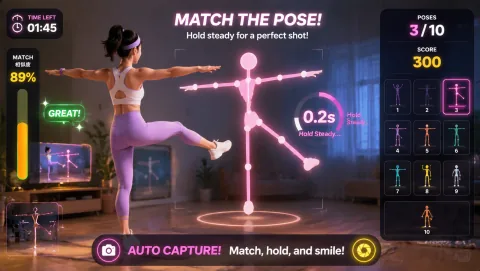
The first 20 minutes of a party are stiff — guests are still arriving, nobody wants to perform. Run a pose-matching game where the fails are the entertainment: someone contorting into a weird silhouette on the big screen gives the room something to laugh about together, which is the actual job of an icebreaker. Keep it optional and keep rounds short; the goal is laughter volume, not high scores.

02

The Mid-Party Peak

Once drinks are poured and the room is loud, switch to competitive formats with a visible score. A rhythm game with a climbing BPM or a reflex game with a shrinking timer both build natural drama: the crowd watches the current run, the score to beat stays on screen, and the next challenger is already stretching. This is where your high-score ladder earns its place on the fridge.

03

The Wind-Down Round

Parties have a moment where energy tips from fun into chaos — that is your cue to swap game types, not to stop playing. A calm two-handed matching game or a slow gesture-puzzle keeps the group gathered around the screen while heart rates come down. End the game block there and let conversation take the room back.

Turn-taking with one camera

Three rotation formats that keep everyone in it

One camera means one player at a time, so the format you pick decides whether the other eleven people are participants or an audience. These three all work; pick by how competitive your crowd is.

The TV setup

Big screen, small camera

Webcam party games are made for projection — the player watches the big screen, the crowd watches the same big screen, and the laptop just needs its camera pointed at the floor. Full placement details are in our guide to playing webcam games on a TV; the host version:

Icebreaker sequencing

Silly, then intense, then settled

The order you run games matters more than which games you own. A room that starts with a score-chase competition feels like a tryout; a room that starts with shared laughter will compete happily an hour later. Sequence the night in three acts.

Act one: fail-forward games

Open with games where messing up is the show — pose-matching and awkward movement games where a failed attempt is funnier than a success. Scores stay low-stakes, turns stay short, and the goal is getting three different guests to volunteer before the first round ends.

Act two: scoreboard games

Once the room is loose, bring out the ladder. Rhythm and reflex games with a score to beat give the night its competitive peak. Announce the current record between rounds — a named record-holder turns a solo game into a room-wide grudge match.

Act three: cool-tempo closers

End the game block on games with a slow tempo and quiet concentration — matching and puzzle games played with the hands. The group stays together around the screen, energy drops to conversation level, and you never have to announce "game night is over." It just lands there.

Wind-down picks

Close the night on these

Want the full set? Browse all free games in the MovePlay game hub, check the webcam games catalog, or run the compatibility test on the host laptop before guests arrive.

Host playbook

The 3 rules that keep the rotation moving

  1. Ninety-second rounds, no exceptions: long turns kill party momentum. Pick games and formats where a run lasts 60 to 90 seconds, and enforce it even when someone is on a hot streak — the streak becomes the score to beat, and the next player is already up.
  2. A visible queue: write the next three names on a notepad or the TV's sticky-note app. A named queue ends the "no, you go" shuffle and gives shy guests a predictable moment to step up instead of a spotlight they have to grab.
  3. Every spectator has a job: scorekeeper, music DJ, queue-caller, or team coach. A guest with a job is participating; a guest with nothing to do is checking their phone. Rotate the jobs along with the camera turns.

Room setup

Space and crowd notes

Clear the play zone of coffee tables, floor lamps, and anything with a glass top before the first round — lateral-step games drift wider than hosts expect. Keep drinks on surfaces behind the player, never on the floor of the play zone, and give the camera spot a no-walk-through rule while a round is live. Match the game to the crowd's state: jumping and stomping games belong in the early, energetic hours; switch to pose-matching and hand-tracking games as the night winds down or the floor gets crowded.

Questions hosts ask

FAQ

How many people can play a webcam game with one camera?

One person plays on camera at a time, but a well-run rotation keeps 8 to 12 guests engaged. The trick is giving non-players a role: the crowd mirrors the player's moves, teams shout guidance, or everyone bets on whether the current run beats the high score. Rounds of 60 to 90 seconds rotate the whole room through in about 15 minutes.

How do I put a webcam party game on the TV?

Connect a laptop to the TV with an HDMI cable, open the game in the laptop browser, and position the laptop so its built-in camera faces the open floor in front of the screen. A USB webcam on top of the TV works even better because players face the screen and the camera at the same time. Keep the play zone about two arm-spans wide and 6 to 8 feet back from the camera.

What order should I run games in at a party?

Open with a low-pressure icebreaker where failing is funny, like a pose-matching game. Move to a high-energy head-to-head once the room is warm, such as a rhythm or reaction game with a running high-score board. Close with a calm two-handed puzzle game while drinks and snacks come back out. The arc matters more than the individual games: silly, then intense, then settled.

What if some guests don't want to be on camera?

Never make camera time the price of admission. Shy guests can be scorekeepers, DJs for the music between rounds, team captains who call strategy, or the person who reads the next silhouette aloud. Most reluctant guests volunteer for a turn once they have watched two or three rounds and seen that everyone looks equally ridiculous.

Do guests need to install anything or make accounts?

No. All MovePlay games run free in a browser tab — no download, no signup, no accounts for guests. The host opens a game page, grants camera permission once, and the party runs off that single laptop for the rest of the night.

MovePlay — Free Webcam Motion Games

Next party, the TV is the game.

Play Neon Stomp Battle free