At a family reunion, one relative wants to compete, another wants to tell stories, and someone would rather watch with a cup of tea. You do not need a game that makes everyone do the same thing. Choose a few short formats with different ways to join, and let people move between them.
Begin with the people, then the rules
Ask about preferences and movements people are comfortable with, without using age as a shortcut for ability. A teenager can dislike being filmed; an older relative can enjoy a target challenge. Keep watching, suggesting, keeping turns and playing as equally welcome roles.
| Format | How to start | How people can join differently |
|---|---|---|
| Photo stories | Choose a few family photos and invite a memory. | Guess, tell a story or simply listen; ask before displaying private photos. |
| Family categories | Name a broad category such as places visited or favourite meals. | Take turns speaking, writing or helping a partner. |
| Soft-target challenge | Offer a basket and rolled socks in a clear zone. | Let players choose a distance and compare their own tries. |
| Camera station | Preview one game and demonstrate its input. | One person plays; others can suggest, watch or take the next turn. |
Give a shared screen a simple role
Hoop Streak gives the player a basketball-themed shooting task. A visible target and result can make a turn easy to follow, but the game’s tutorial decides the actual movement. Preview it with the person who wants to play rather than assuming everyone can copy the same motion.
For a more puzzle-led station, Ball Sort changes the decision from a sports target to a sorting task. Compare the cards below and let the next player choose. A TV or projector can make the screen easier to see, but the camera must remain connected to the device running the game. A larger display does not add simultaneous multiplayer support.
Use fair turns instead of one universal scoreboard
Agree on the turn order and what happens when someone wants to skip. Avoid comparing scores from different games or different control setups. A player can try to improve their own previous turn, or the family can set an informal shared goal such as learning each other’s favourite game.
Leave gaps for conversation. If a queue grows, give waiting guests another activity rather than asking them to crowd the camera. A helper can explain the tutorial; they should not move inside the active player’s zone. Keep the device secure, check the movement area and stop when the player chooses.
Offer a complete evening, with an offline option
The camera station should be one invitation among others. Photo stories and category games work when someone does not want a screen, the network fails or account access has not been arranged. Check the current free and Pro rules before promising a particular title to guests.
Use the family challenge turn sheet to keep the order clear, the TV setup guide for a shared display, and the event-station plan for a larger gathering. Review camera privacy and sharing before posting any result that includes another person. Ask first, and let the memory of the evening matter more than a public leaderboard.
Games to preview
Review the controls, play area and access label before opening a game.

Hoop Streak
Catch a pass with a side-step, lift the ball overhead and time the release to sink the basket.
Controls: Side-step to catch; raise a hand overhead and lower it to release.
First-round idea: Catch a pass and land a basket before trying a scoring streak.
Pro · sign-in required
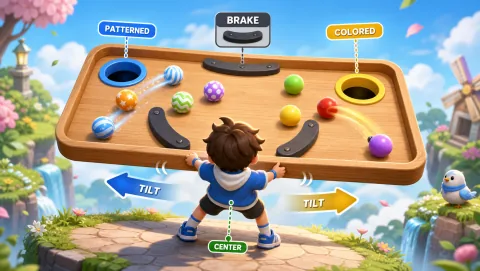
Ball Sort
Tilt a wooden tray to sort colored and patterned balls into different holes without overshooting.
Controls: Tilt shoulders, return to center to slow, spread arms for fine control.
First-round idea: Guide a ball over a brake pad and into the matching hole.
Pro · sign-in required