You can play movement-controlled games on a laptop or PC, but “exercise game” can describe very different demands. Jogging, reaching, pinching and turning your head do not require the same room, posture or effort. Pick the actual input you want, then check the camera and access rules. A game score is not a workout prescription or a fitness measurement.
Three ways to choose a laptop movement game
| What you want to do | MovePlay example | Check before opening |
|---|---|---|
| Jog, steer and duck in a full-body game | PulseWing | Full-body framing, lateral movement, overhead reach and floor impact. |
| Reach toward targets while standing | WhackAMole | The full arm sweep, target visibility and space beside the device. |
| Use smaller head-led input | LaserEyes | Face visibility and comfortable head movement; this is not a cardio substitute. |
These are control comparisons, not measured intensity rankings. PulseWing uses jogging to fire and also asks for leaning, ducking and an overhead clap. Do not select it for a no-jumping or noise-sensitive activity simply because it runs in a browser. A quieter option may need less floor movement while still requiring concentration.
Set up the laptop without creating a new obstacle
- Place the laptop or webcam securely in the position you will use during play. Keep charging leads and furniture out of the movement area.
- Open the chosen game and read its instructions before stepping back. Check the current free selection or sign-in/Pro requirement.
- Allow the camera only when you intend to use it. Face a light source rather than standing with a bright window behind you.
- Test the smallest required movement first. Confirm that targets respond and that the full action stays visible.
- Stop if the posture, room, device temperature or response feels unsuitable. Change one setup variable at a time before trying again.
The camera setup guide explains framing. There is no universal laptop distance: a close hand game and a full-body game see different regions. Hardware, browser and lighting also affect tracking; the device checklist is not a completed compatibility benchmark.
A short trial before committing to a longer session
Try a practice period to learn the controls, then one complete game round at a pace you choose. Afterwards ask three questions: did the input respond clearly, could you make the required movement comfortably, and would you choose another round? A familiar game with readable feedback is often a better first choice than the most physically demanding one.
Keep game types separate when deciding what to repeat. Hand puzzles may suit a desk setup; target-reaching games need wider clearance; jogging games introduce repeated foot impact. For apartment constraints, see quiet movement choices. For a larger display, connect the running device to the TV rather than assuming the television itself can run the game.
Browser game, guided workout or motion console?
Choose a guided workout when you want instruction and a planned routine; choose a movement game when you want movement to control a challenge. A dedicated motion console is another purchase and setup path. Compare it through Nex Playground versus browser play rather than assuming that every no-controller product works identically.
Cost, accounts and results
The cards below show the current access label from MovePlay’s game configuration. Browser delivery means no separate game installer; it does not mean the entire catalog is free or that paid games skip account verification. Review the current plans after a suitable first trial.
Do not use estimated energy values or reaction scores as a clinical assessment. If your goal involves pain, rehabilitation or a personalised exercise plan, the game selection here does not answer that medical question. For ordinary recreation, choose the movement and length that fit your own situation.
Games to preview
Review the controls, play area and access label before opening a game.

PulseWing
Jog to fire through a space-interceptor campaign, dodge lasers and save a missile volley for the boss.
Controls: Jog to fire, move sideways, squat under lasers, clap overhead for missiles.
First-round idea: Try each movement control before chasing the boss.
Free through 2027-07-29 (UTC)

Whack A Mole
Reach moles before they disappear and keep the next target in view.
Controls: Reach or lean toward the mole positions.
First-round idea: Hit the next visible mole without rushing the return to center.
Pro · sign-in required
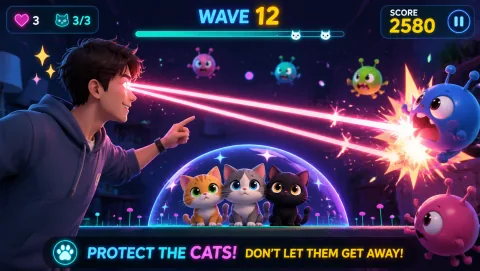
Laser Eyes
Aim lasers with head orientation and protect the cat from approaching monsters.
Controls: Turn your head to aim; keep the face visible.
First-round idea: Track a monster while keeping the cat out of the firing line.
Pro · sign-in required