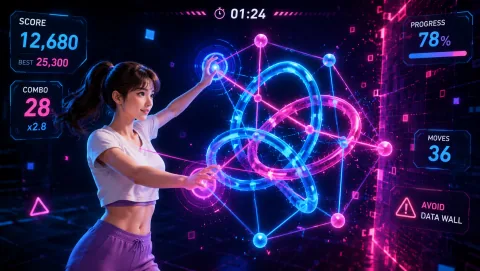
After school movement games

After school movement games

Movement programming for the 3-to-6 p.m. shift: mixed-age groups, 30–60 minute blocks, one or two staff, and a room that's also the cafeteria. Webcam games that run from a single laptop and mostly supervise themselves.

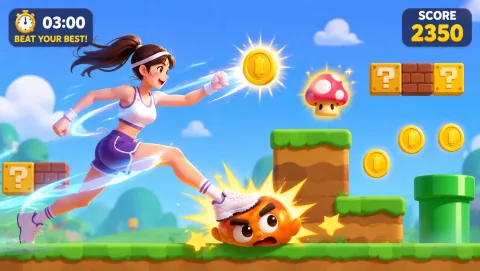
GenkiRun gameplay preview
GenkiRun A 2D side-scroller powered by arm swings — swing to run, leap obstacles, stomp enemies, grab coins. Feet stay in place, so it works in crowded multipurpose rooms.
Best for

Best for after-school program coordinators, club leaders, and rec-center staff running mixed-age groups (roughly ages 5–12) in 30–60 minute activity blocks, with one shared screen and a staffing ratio that doesn't allow a dedicated activity leader per station.

01

The Arrival-Window Opener

Kids trickle in for the first 20 minutes while parents sign them out of the school day — the worst window for any activity that needs everyone present. A projected webcam game absorbs drop-ins naturally: kids join the play-along crowd or add their name to the turn list whenever they arrive, and latecomers miss nothing because rounds restart every minute or two.

02

The Post-Homework Release Valve

Programs that run homework time first know the moment: 25 kids who sat quietly for 40 minutes suddenly have bodies again. A 15-minute movement block right after homework period burns that pressure off before free choice, and it gives staff a clean, visible transition — homework tables clear, game screen on, energy spent where the noise is allowed.

03

The Friday Tournament

A standing weekly tournament turns a free browser game into programming with continuity. Run a ladder bracket on one reflex game, post scores on the wall, and carry the leaderboard across weeks. Kids who aged out of the running can officiate — tournament brackets create staff-helper roles that older kids actually want.

Mixed-age formats

One screen, ages five to twelve

The core after-school problem is that your group spans seven grade levels and none of them want the same thing. These formats keep every age inside one activity without splitting staff.

Session skeletons

A 45-minute block, start to finish

A repeatable skeleton beats a fresh plan every day — kids settle faster when the shape of the block is predictable, and new staff can run it from a card.

Low-supervision design

Build the station to run itself

With one staff member covering the room, the movement station has to absorb questions and disputes on its own. Everything a kid might ask should be answered by a posted card, not by an adult.

Post the three cards

Tape up a one-line how-to-play card, the house rules (feet behind the tape line, hands off the laptop, round ends when the game says so), and the self-serve sign-up list. Kids who can read run the station for kids who can't — the cards make that possible.

Let the game end the turn

Choose games where a round has a built-in end — a run finishes, a timer expires, the board clears. When the software announces "next player," staff never have to, and turn-length arguments disappear because the screen is the referee.

Give waiting kids a job

Scorekeeper with a clipboard, DJ for the round timer, or line captain who calls the next name. Unstructured waiting within arm's reach of a laptop is where poking the keyboard starts; a titled job converts that energy into help.

Wind-down picks

Close the block on these

Want the full set? Browse all free games in the MovePlay game hub, check the games for kids collection, or read the Classroom Movement Games That Get Students Active guide if your program shares space with a school day.

Program management

House rules that survive staff turnover

  1. Same corner, same setup: the movement station lives in one marked spot with the camera angle pre-set and the games bookmarked. Consistency is what lets a substitute or volunteer run the block from the posted cards without a training session.
  2. The sign-up list is the law: kids write their own names, play in order, and re-join the bottom after a turn. Staff never arbitrate whose turn it is — they point at the list. This one rule removes most of the supervision load.
  3. Volume buys game time: in a multipurpose room where another group is reading ten feet away, tie the privilege directly to noise — the station stays open as long as the group keeps its sound under the posted ceiling. Kids police each other when the game is what's at stake.

Room setup

Space and camera notes

Multipurpose rooms and gyms echo — put the laptop and projector against a wall so the play zone faces away from the homework tables, and tape a two-arm-span box on the floor for the on-camera player. Crowd play-along kids need an arm's length of space each; stagger them like a fitness class rather than a huddle. On days when the room is split with another program, skip the jumping games and run the hand-controlled and rhythm picks — they carry a full block on their own. Keep water bottles and backpacks outside the taped area, and end every block with a slow game so nobody sprints to the pickup line.

Questions coordinators ask

FAQ

How do I run one movement game for kids aged 5 to 12 at the same time?

Put the youngest kids on camera and give the older kids jobs that matter: referee, scorekeeper, line manager, or move coach who demonstrates the action first. Older kids stay engaged because the role carries status, and younger kids get the turns. For head-to-head play, handicap by age — the 11-year-old plays left-handed or starts 10 points down — so mixed-age matches stay competitive instead of lopsided.

Can a movement station run with only one staff member watching the whole room?

Yes, if the station is designed to self-run. Post three things at the laptop: a one-line how-to-play card, a written turn list where kids sign up themselves, and a sand timer or on-screen round limit that ends each turn. Pick games with fixed, short rounds so nobody has to referee turn length. Your staff member supervises the room; the posted materials supervise the station.

How many kids can share one laptop?

One laptop with a projector comfortably handles 10 to 15 kids in a play-along format — one child on camera, everyone else mirroring the moves. Without a projector, plan on 2 to 4 kids per laptop taking turns in short rounds. Programs with more than 15 kids usually run two stations or split the group between the screen and a floor activity, then swap halfway through the block.

Do the games need accounts, downloads, or a fast network?

No accounts and no downloads — MovePlay games open in a browser tab on the program laptop, and kids never touch a login screen. The camera feed is processed on the device, not uploaded. After the page loads once, the games are forgiving of mediocre Wi-Fi, which matters in gyms and multipurpose rooms where the signal is weak. Bookmark the two or three games you actually use so staff can open them in seconds.

What if some kids can't or don't want to do jumping games?

Build every session menu with three tiers: a full-body game, a standing-but-low-impact game, and a seated or hands-only game, so nobody is singled out with a separate activity. Hand-controlled and head-controlled games deliver the same turn-taking and group energy without jumping. Kids opt into the tier that suits them that day, and the choice can change day to day without any conversation about it.
MovePlay — Free Webcam Motion Games

Tomorrow at 3 p.m., open a tab instead of planning an activity.

Play GenkiRun free