Please read first: This page is an informational resource for caregivers, not medical, therapeutic, or clinical advice. Children with special needs are not one group — what delights one child may distress another. For any individual activity plan, consult the child's occupational therapist, physical therapist, or other clinicians who know them. MovePlay games are play, not treatment.

Adaptable play ideas

Movement games for children with special needs

Browser camera games that respond to whatever movement a child can offer — a turning head, one reaching hand, a small shift of weight. Organized here by support need, with concrete ways to adapt every idea, because the caregiver who knows the child is the real expert in the room.

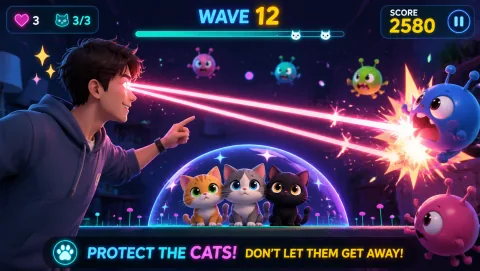
LaserEyes gameplay preview
LaserEyes Guided entirely by head direction — a frequent first choice when hand or leg movement is limited, and playable fully seated.
Best for

Parents, caregivers, and teachers looking for playful movement ideas they can adapt to an individual child — with professional guidance leading, and the child's comfort deciding what continues.

01

Support need, not diagnosis

Diagnoses don't play games — individual children do. Two children with the same diagnosis can have opposite sensory profiles and completely different movement ranges. So this page is organized by what the child actually needs support with: movement range, sensory sensitivity, attention span, or staying seated. Match the game to the child in front of you.

02

Games take what they get

Camera games track whatever movement arrives — there is no minimum ability threshold to clear before play begins. A small gesture registers the same as a sweeping one. That makes these games unusually adaptable, but it doesn't make every game right for every child: pacing, sound, and visual intensity still differ from title to title.

03

Caregiver judgment leads

No webpage can see your child. The suggestions below are starting points to discuss with the people who know the child — you, their therapists, their teachers. Studies on movement and engagement generally suggest that playful, self-chosen activity holds children's attention better than prescribed drills, which is a reason to experiment gently — not a promise about any individual child.

How to choose

Match the game to the support need

Four common support profiles, and what tends to fit each. These are general patterns, not rules — the child's own reactions overrule anything written here.

Adaptation toolkit

Six ways to adapt any idea on this page

None of these require special equipment — they're decisions the adult makes before and during the session.

Session structure

A predictable routine beats a long session

  1. Same opener every time: begin each session with the same familiar game — repetition builds safety. LaserEyes or BubbleMatch both work as calm openers.
  2. Short rounds: one to three minutes per round, one or two rounds per game. For a first session, five to ten minutes total including pauses is plenty.
  3. One new thing at most: if the session introduces anything unfamiliar — a new game, a new position, sound switched on — change nothing else that day.
  4. Easy stop: agree on the stop signal before starting (the visual timer, a hand sign, a word). When it happens, stop immediately and without negotiation — ending cleanly is what makes the next session easy to start.
  5. Same closer every time: end with the same brief, enjoyable round so the session always finishes on a success, then stop while it's still fun.

Sensory considerations

Sound, light, and visual intensity

Sound is optional, always

Every MovePlay game plays fine muted. For sound-sensitive children, start muted and treat audio as something to add later only if the child asks for it. Headphones are another option when household noise, not game sound, is the issue.

Visual intensity varies by title

Fast titles with flashing feedback (the rhythm and reflex games) are the most stimulating on the platform. The six games recommended above are the calmer end — but "calmer" is relative, so an adult should preview any game alone first before offering it to a visually sensitive child.

The room matters too

Screen glare, backlighting, and a cluttered camera background add sensory load and make tracking worse. Face the child toward soft, even light, clear the space behind them, and lower screen brightness — small changes that often decide whether a session works.

Caregiver notes

Your observations are the most valuable data

Stay in the room, especially at first. Watch for early signs of overload or fatigue — covering ears, turning away, faster breathing, going quiet — and stop on the first sign, not the third. After each session, jot down what the child chose, how long they engaged, and what triggered stopping; that log is genuinely useful for the child's occupational therapist or teacher when you discuss whether games belong in their routine. Participation must always be voluntary: a child who doesn't want to play today has answered the question, and that's fine. For settings where movement games sit alongside professional support, see MovePlay for therapy and rehab professionals — and remember that MovePlay is a play platform, not a therapeutic tool, and never a replacement for clinical care.

Common questions

FAQ

Are motion games suitable for autistic children?

It depends on the individual child — there is no game that suits every autistic child, and no single trait that predicts what will work. Some children enjoy the predictable cause-and-effect of camera games; others find the visual feedback or sound overwhelming. Start with one quiet, low-intensity game for a few minutes, let the child help choose it, and rely on a caregiver who knows the child to judge whether to continue. If the child works with an occupational therapist, ask for their input first.

Can movement games replace therapy?

No. Motion games are play, not treatment. They are not a medical or therapeutic intervention and cannot replace occupational therapy, physical therapy, or any other professional support. At most, a game can be an enjoyable supplement to a plan designed by the child's clinicians — and only with their agreement. Any movement goals for the child belong in that professional plan, not in a game session.

What if my child can only move one hand?

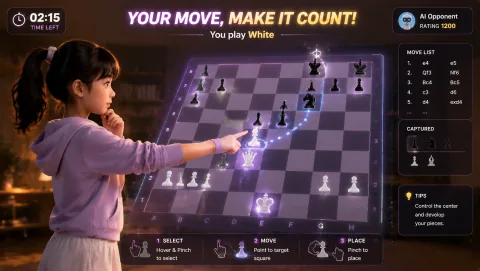
Several MovePlay games are controlled by a single hand, or by no hands at all. CyberKnot untangles puzzles with one hand's finger gestures, GestureChess moves pieces with point-and-pinch gestures from one hand, and LaserEyes follows head direction so the hands can rest entirely. All three work from a seated position.

How long should sessions be?

Shorter than most adults expect. A good first session is five to ten minutes total, including pauses — one or two short rounds with a break in between. End while the child is still enjoying it rather than playing until fatigue. A visual timer makes stopping predictable instead of abrupt, and watching for signs of overload matters more than hitting any target duration.

Start small

One quiet round, chosen by the child, stopped on their signal.

Play LaserEyes free