MovePlay offers recreational webcam games, not therapy or a medical assessment. Someone considering a game alongside an existing care plan should discuss its actual movements with their treating professional. A game score, camera feedback or activity estimate cannot establish recovery, prescribe intensity or replace that plan.
What a game can tell you
The tutorial explains the action used to control a game: for example, head aiming in LaserEyes, pinch gestures in GestureChess or arm reaches in FruitSlash. These descriptions help identify the movement to discuss. They do not establish a diagnosis-specific exercise, safe range of motion or treatment benefit.
| Game | Observable input | Limit of the description |
|---|---|---|
| LaserEyes | Turn the head to aim and hold the aim to fire. | Not a neck exercise prescription; camera and target demands vary. |
| GestureChess | Use pinch gestures to control chess pieces. | Not a fine-motor assessment. The task also depends on game rules and gesture recognition. |
| FruitSlash | Reach or sweep the arms toward fruit targets. | Targets and game timing do not define a professionally selected movement range. |
Discuss the exact task before trying it
- Show the tutorial and the movements a complete round requires.
- Check whether standing, reaching, head movement or a time limit fits the person's restrictions.
- Confirm a comfortable setup, help with controls if needed, and define a stopping point.
- Do not push through discomfort to complete a round. Choose another activity when the game does not fit.
This is especially relevant when a person has recent surgery, a movement restriction or a prescribed rehabilitation programme. The suitability decision belongs to the treating professional, not a game recommendation page.
Scores are game feedback
A better score can reflect learning the rules, better lighting, improved tracking or familiarity with the timing. It does not directly demonstrate functional recovery, balance improvement or a change in symptoms. If a professional requests a log, distinguish the game played and the time spent from clinical measurements.
What published exergaming research can and cannot establish
Studies of interactive games use specific devices, tasks, participants and supervised protocols. They should not be treated as evidence that MovePlay produces the same outcomes. We have not presented a MovePlay clinical trial or validated clinical benchmark here, and make no quantitative treatment or adherence claim.
Device setup, privacy and access
Read the setup guide to check framing, lighting and camera permissions. Camera frames used for tracking are processed on the device; accounts and session reporting are separate services covered by the privacy policy. The hub shows current free access, while paid games require sign-in and Pro. Check current plans.
Questions before choosing a game
Is MovePlay a medical device?
MovePlay is presented as recreational browser gaming. This page makes no medical-device or clinical-treatment claim.
Can a game replace a prescribed home exercise?
No. Follow the treating professional's plan. Discuss the game's actual movements if you wish to consider it as a separate recreational activity.
Which game is best for recovery?
There is no diagnosis-specific ranking on this page. Compare the observable movements with the person's restrictions and preferences, with professional guidance where needed.
Games to preview
Review the controls, play area and access label before opening a game.
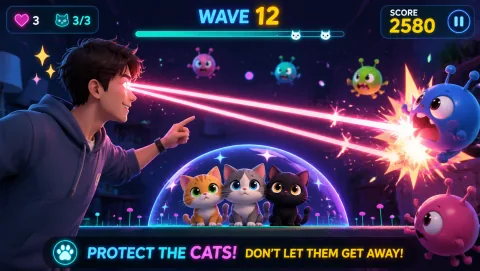
Laser Eyes
Aim lasers with head orientation and protect the cat from approaching monsters.
Controls: Turn your head to aim; keep the face visible.
First-round idea: Track a monster while keeping the cat out of the firing line.
Pro · sign-in required

Whack A Mole
Reach moles before they disappear and keep the next target in view.
Controls: Reach or lean toward the mole positions.
First-round idea: Hit the next visible mole without rushing the return to center.
Pro · sign-in required