Upper-body tracking only
The games below read hand, arm, or head positions from the webcam. Your legs can stay still — the camera never needs to see below your shoulders.
Accessible motion games
Camera games controlled by your hands, arms, or head — no standing, jumping, or floor space required. Just a chair, a webcam, and a browser tab.

Players who prefer or need to stay seated — desk workers on a break, wheelchair users, older adults, or anyone having a low-energy day. If you have health concerns, check with a professional before new exercise.
The games below read hand, arm, or head positions from the webcam. Your legs can stay still — the camera never needs to see below your shoulders.
A seated player needs about an arm's length of clearance in front of the screen and a chair that stays put. No mats, no open floor, no rearranging furniture.
Each game runs in short rounds you start yourself. Pause between rounds, replay a slow one, or stop after two minutes — the pacing is set by the player, not the software.
Play from a chair
All five are free browser games on MovePlay — Free Webcam Motion Games. Each one is controlled by hands, arms, or head movement, so they play naturally from a seated position. No downloads, no controllers.
BubbleMatch
Match colored bubbles with one hand. Unhurried rounds and big, high-contrast targets make this the easiest entry point for seated play — your working hand stays within a comfortable reach in front of your torso.
02
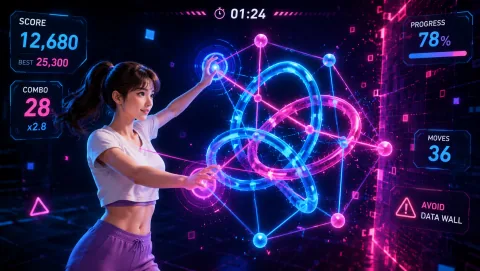 CyberKnot
Untangle glowing knots with finger gestures. It rewards slow, precise hand movement rather than speed — a puzzle you solve at desk height.
03
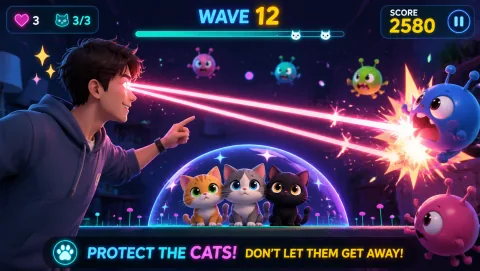 LaserEyes
Steer targets with head and eye direction. The gentlest option on this list — your hands can rest entirely while small head movements do the work.
04
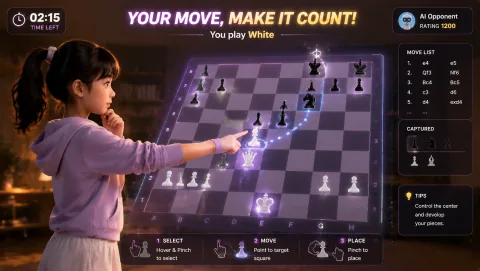 GestureChess
Play chess by pointing and pinching in front of the camera. Fully turn-based, so there is never any time pressure — think as long as you like between moves.
05
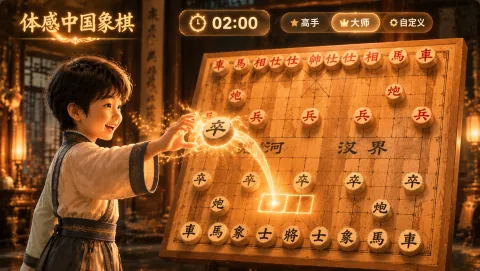 GestureXiangqi
The same hand-gesture controls applied to xiangqi (Chinese chess). Deliberate, untimed moves suit players who want a thinking game with light hand movement for seniors and strategy fans alike.
Camera setup
Standing games want the camera high and far back so it can see your whole body. Seated play is the opposite: bring the camera down and closer so your hands and shoulders fill the frame.
Lower the camera to chest or shoulder height. A laptop on a desk is usually about right; a stack of books or a small tripod fixes a screen that sits too low.
Sit about an arm's length away — close enough that your hands stay inside the frame when you raise them to shoulder level.
Face a light source rather than sitting with a window behind you. Backlighting turns you into a silhouette and makes hand tracking unreliable.
Use the live camera preview shown in every MovePlay game to check framing before you start — if you can see your hands and shoulders clearly, so can the game.
Adjustable intensity
Every game on this page runs in self-started rounds. Play one round, rest as long as you like, then decide whether to play another. Nothing auto-advances.
Hand-tracking games respond to position, not force. Slow, small gestures register just as well as big fast ones, so you can keep movements inside a comfortable range.
Alternate a one-hand game like BubbleMatch with a head-guided game like LaserEyes to rest your arms while still playing. Rotation beats repetition for long sessions.
Who this suits
Keep it comfortable
Choose a stable chair without wheels that roll easily, keep the floor in front of you clear so your feet rest flat, and stop if your hands, neck, or shoulders feel strained. These games are designed for entertainment, not as exercise programs — if you have health concerns, check with a professional before new exercise.
Common questions
Yes. Games that track hands, arms, or head movement instead of legs and feet work from a chair. On MovePlay, titles like BubbleMatch, CyberKnot, GestureChess, GestureXiangqi, and LaserEyes are controlled entirely by upper-body movement, so the camera only needs to see your hands, shoulders, or face.
Hand-tracking games need no leg movement at all. BubbleMatch asks you to match colors with one hand, CyberKnot untangles knots with finger gestures, and GestureChess and GestureXiangqi let you move chess pieces by pointing and pinching in front of the camera. LaserEyes is even gentler — it follows your head and gaze.
BubbleMatch is the gentlest starting point: rounds are unhurried, targets are large and high-contrast, and your working hand stays within a comfortable reach in front of the torso. GestureChess and GestureXiangqi suit players who prefer thinking games with slow, deliberate hand movements. MovePlay games run in a browser, so there is nothing to install.
Lower the camera to roughly chest or shoulder height — a laptop on a desk or a stack of books works — and sit about an arm's length away, close enough that your hands stay inside the frame when raised. Face a window or lamp rather than sitting with light behind you, and check the live camera preview on screen before starting so you can see exactly what the game sees.
Sit back and play