Shapes + movement, ages 3–6

Webcam shapes games for kids

Shape practice for preschoolers and kindergartners that starts with the body: trace a triangle in the air, become a circle, then reward the wiggles with free webcam motion games — no download, no signup.

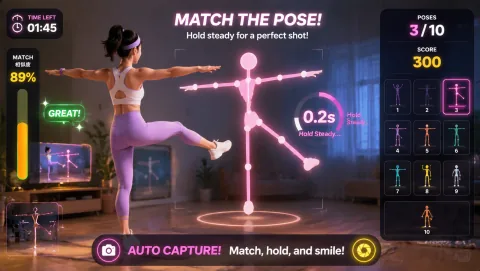
Awkward Pose Studio gameplay preview
Awkward Pose Studio A silly silhouette appears — your child has 3 seconds to match it with their body. Arms wide, one leg up, twisted sideways: pose play is the closest thing to making shapes with your whole self.
Best for

Best for parents of 3–6 year olds and preK/K teachers who want shape-themed movement play: body-shape warm-ups first, then short webcam game rounds as the active reward, all from one laptop.

01

Make the Shape With Your Body

Call out a shape and let kids build it: arms in a big ring for a circle, fingertips together overhead with elbows out for a triangle, four stiff limbs for a square. The poses never come out perfect — that's the point. A wobbly body-triangle still gets named out loud, and the naming is where the shape vocabulary actually sticks.

02

Trace It in the Air

Big air-tracing comes before pencil tracing. Start with a two-handed circle the size of a hula hoop, then shrink it to dinner-plate size, then to a coin. Triangles get three deliberate chops; squares get four corners kids have to "tap" in the air. Slow, oversized movements are easier for small arms to control than fast small ones.

03

Shape Hunt, Then Play

Send kids on a 60-second hunt — "find something round in this room" — then come back and play a webcam game round as the payoff. The hunt does the noticing, the game does the moving, and the loop (hunt, name, play) holds a preschooler's attention far better than any single stretch of either one.

A 10-minute home session

The shape-and-play loop

Preschool attention runs in short cycles, so structure the session as small loops instead of one long activity. This is a template you can repeat daily with a different featured shape.

Rug time for preK and K

Running it with a class

One laptop and the classroom display turn this into a group activity. The trick with four- and five-year-olds is that everyone needs a job every second — waiting bodies start wandering.

Keeping little bodies safe and happy

Ground rules for the 3–6 crowd

Preschoolers play harder and stop later than they should, so the session structure has to do the regulating for them.

Clear one marked spot

Tape a square on the floor where the camera sees best, and make "stay on the square" part of the game. Corners of coffee tables and toy piles are the real hazards — move them before you start, not after the first bump.

Favor poses over jumping

For this age, pose-matching and hand games beat jumping games most days: slower, easier to control, and an adult can stay within arm's reach. Save the hopping games for open rooms and days when nobody's overtired.

End on a slow game

A quiet hand-tracking round after the active one brings breathing and voices back down. Kids this age don't wind down on command — they wind down by doing something calmer, so make the last game the calm one.

Calm-down picks

End the session on these

Want more? Browse all free games in the MovePlay game hub, or check the games for kids collection for age-friendly picks.

Facilitation tips

What makes shape play work at this age

  1. Name everything twice: say the shape name when you call it and again when the child makes it — "triangle… yes, that's a triangle!" Repetition in the moment of movement is what builds the word-shape link, not worksheets.
  2. Imperfection wins: never correct a body-shape into perfection. A lumpy circle is still a circle, and correcting the pose teaches a preschooler that the game is about being right, which ends the fun fast.
  3. Keep games in their lane: let the hands-on parts carry the shape practice and let the webcam games carry the movement. Games that try to "teach" usually do both jobs worse — play time stays play time, and kids come back to it willingly.

Setup notes

Room and camera basics

A laptop on a table at the child's chest height, angled at a clear floor patch, is all the setup this needs. Tape the play spot, keep an adult within arm's reach for any jumping, and follow the child's energy: if focus is gone, switch to a slow hand game or stop — a five-minute session that ends happy beats a fifteen-minute one that ends in tears. Movement games are active play between shape activities, not a replacement for them.

Questions parents ask

FAQ

What age are these shape activities for?

The body-shape activities here are built for preschool and kindergarten kids, roughly ages 3 to 6. At that age the goal is simple: recognize circles, squares, triangles, and rectangles, and have fun making them. Keep sessions to 10 minutes or less, because attention spans at this age are short and quitting while it's still fun is what makes kids ask to play again.

Do webcam games teach my child shapes?

No — and you should be skeptical of any game site that claims it teaches a curriculum. MovePlay games are reflex, coordination, and movement games. The shape learning happens in the hands-on parts: tracing shapes in the air, making them with arms and legs, spotting them around the room. The webcam games are the active play wrapped around that practice, which keeps young kids engaged far longer than flashcards alone.

Is a webcam motion game safe for a 4-year-old?

With an adult nearby, yes. Clear a patch of floor about two arm-spans wide, move anything with corners out of the play zone, and stay within arm's reach for the jumping games. For this age group, favor pose-matching and hand games over high-energy jumping, keep rounds under a couple of minutes, and stop while the child is still having fun rather than waiting for a meltdown.

How do I use these in a preK classroom?

Run it as a rug-time activity with one laptop connected to the classroom display. One child goes on camera while the rest copy the poses from their rug spots — nobody is just waiting. Rotate the on-camera kid every round. Ten minutes covers a full shape-themed block: a body-shape warm-up, a few rounds of a pose game, and a slow hand game to bring energy back down before the next activity.

What do I need to play?

A laptop or desktop with a webcam and a Chrome, Edge, or Safari browser. MovePlay games are free, run in the browser with no download, and need no accounts — important for little kids, since there's nothing to sign up for and nothing saved. Point the camera at open floor, open the game page, and you're playing in under a minute.

MovePlay — Free Webcam Motion Games

Today's shape is whatever their body makes next.

Play Awkward Pose Studio free