Design for the passerby’s first five seconds
The screen, host, floor mark, and result should answer three questions quickly: what do I do, how long does it take, and what happens when I finish?
Pop-up activity design
Design the experience like a small public station: clear invitation, one action, short attempt, fast reset, and an optional next step.
Updated August 30, 2026 · Editorial guide based on the current MovePlay game controls

Best for event teams, libraries, community programs, retail pop-ups, exhibitions, school open days, and staffed activity stations.
The screen, host, floor mark, and result should answer three questions quickly: what do I do, how long does it take, and what happens when I finish?
A one-minute round with a visible reset usually beats a sophisticated game that creates a queue. Write the host script before choosing the game.
A visitor can play without surrendering a name, photo, email, or recording. If an offer or sign-up is present, make it a separate, clear opt-in after the game.
Choose by constraint
These are practical starting points based on each game’s actual control style. Test the camera and room before extending the session.
| Your situation | Start with | Why it fits |
|---|---|---|
| People need to understand the game from a distance | Reaction or Whack A Mole | A large target and one obvious action communicate the activity quickly. |
| The booth has a narrow footprint | Laser Eyes or Awkward Pose Studio | Contained aiming or pose prompts reduce floor travel and queue friction. |
| The audience includes children and adults | Bubble Match or Reaction | Use a host-led explanation, short turns, and different roles rather than one intensity target. |
Practical playbook
Keep the first session small, specific, and easy to stop. The goal is not to create a perfect workout. The goal is to make active play feel like a normal option.
Begin with a single short pop-up motion games round to test the real setup: camera position, lighting, and floor space before inviting a group.
Let the first player choose the opening game, then rotate so everyone gets a turn shaping the session.
Track completion, not perfection: one round finished is already a useful data point.
Why it works
An event station has less explanation time than a home session. Visible action, fixed duration, and a clear waiting role are operational quality signals.
Camera input, photographs, scoreboards, and marketing follow-ups should not be bundled together. Give people a meaningful choice before collection or sharing.
If the room becomes crowded or the camera view changes, switch to a contained game rather than asking visitors to move through an untested area.
Sources and limits
These links provide background for the guidance above. They do not turn a MovePlay game into a clinical assessment or guarantee a particular health, learning, or relationship outcome.
Start here
These games are browser-based and use body movement through a webcam. No controller or download required.
Reaction
4 numbers scatter to the corners — slap them in order with hands and feet. The timer shortens fast; slow reactions cost points.
02
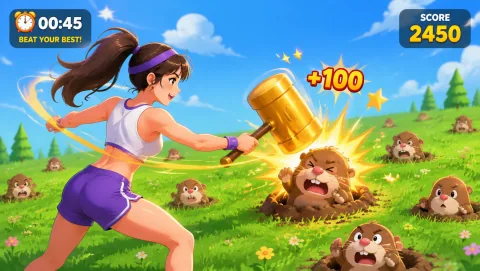 Whack A Mole
Moles pop up — smash them hard. Miss one and the rhythm spirals out of control.
03
Whack A Mole
Moles pop up — smash them hard. Miss one and the rhythm spirals out of control.
03
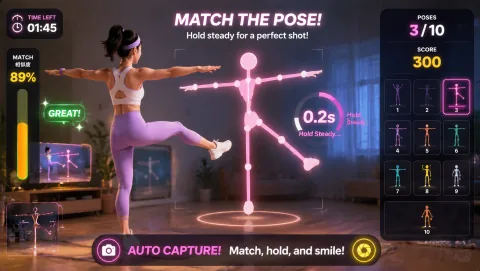 Awkward Pose Studio
Match the tricky body silhouette within 3 seconds and strike a pose for the photo.
04
Awkward Pose Studio
Match the tricky body silhouette within 3 seconds and strike a pose for the photo.
04
 Laser Eyes
Micro-turn your head to aim, hold your gaze to fire lasers — eliminate monsters without hitting the cat.
Laser Eyes
Micro-turn your head to aim, hold your gaze to fire lasers — eliminate monsters without hitting the cat.
Simple routine
Use a fixed script so new hosts can operate the station consistently during a busy program.
More options
 Fruit Slash
Slash fruits with sweeping arms — the moment a bomb appears, pull back instantly.
06
Fruit Slash
Slash fruits with sweeping arms — the moment a bomb appears, pull back instantly.
06
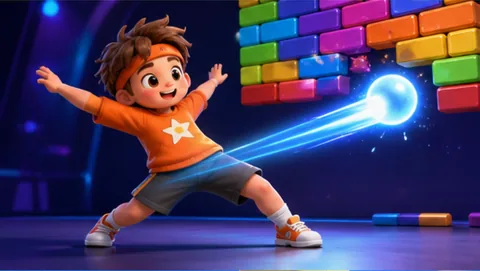 Paddle Guard
Move your body as the paddle, bounce the ball and smash all the bricks!
07
Paddle Guard
Move your body as the paddle, bounce the ball and smash all the bricks!
07
 Bubble Match
Point both hands at matching bubbles to chain and pop them — rainbow bubbles are wild, bombs clear the area.
Bubble Match
Point both hands at matching bubbles to chain and pop them — rainbow bubbles are wild, bombs clear the area.
Keep it realistic
Cover cables, maintain an accessible route, keep the camera background appropriate, assign a host, and leave room for stopping. Avoid impact-heavy or wide-travel movement when the crowd or venue cannot support it.
Common questions
It should be legible from a distance, quick to explain, short to play, easy to reset, and connected to a clear optional next step.
They can use them as a staffed station when the venue checks equipment, camera privacy, floor space, staffing, and participant choice.
Start with roughly one minute of play plus invitation and reset time, then adjust for the real queue.
Only through a separate, clear opt-in. Playing a camera game should not silently enroll someone in marketing or recording.
Move first, scroll later