Workplace wellness

Office wellness games that actually get your team moving

Wellness programs that work require no friction and immediate fun. These browser-based movement games serve as team meeting icebreakers, lunchtime challenges, and daily break rituals — no hardware purchases, no IT approvals, no coordination overhead.

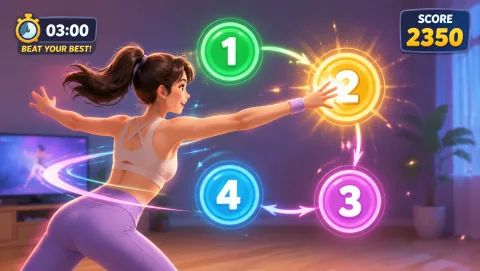
Reaction gameplay preview
Reaction 4 numbers scatter to the corners — slap them in order. Competitive group play that works remote or in-office.
Best for

HR teams, remote team managers, and corporate wellness coordinators looking for movement activities that work for distributed teams with zero hardware cost.

01

5-Minute Team Breaks That Actually Happen

Most corporate wellness programs fail because they require scheduling, space allocation, or specialized equipment that creates friction. A MovePlay team break needs nothing but a browser and a webcam that employees already have. Competitive rounds — each person plays Reaction and posts their score in Slack — take 5 minutes and happen spontaneously rather than requiring a meeting block.

02

Remote Meeting Icebreaker

The Draugiem Group's research found that top productivity performers took regular breaks in a specific ratio (52 minutes of focus, 17 minutes of rest). Starting a remote meeting with a 3-minute MovePlay challenge before the agenda begins isn't wasted time — it's alignment time. Teams that start meetings with physical engagement show higher verbal participation and decision-making speed in the meeting that follows.

03

Lunchtime Score Challenge

Post a daily game and score target in your team Slack channel. Whoever achieves the highest score on AwkwardPoseStudio or FruitSlash by EOD wins a small recognition. This format requires zero synchronization — people play during their lunch break at whatever time works — and generates consistent movement, team banter, and a shared reference point that improves team cohesion.

Practical playbook

How to implement office wellness games in your team

The most successful workplace wellness programs are those that reduce participation friction to near zero. MovePlay achieves this by being a URL — something every team member can access in seconds on their existing work device.

Why it works

The business case for workplace movement breaks

Workplace wellness ROI: $3.27 per $1 spent

Baicker et al. (2010) published a meta-analysis in Health Affairs finding that well-designed workplace wellness programs return $3.27 in reduced medical costs for every $1 invested — and $2.73 in reduced absenteeism costs. Movement-based breaks are among the most cost-effective wellness interventions, particularly when they require no equipment investment, as with browser-based movement gaming.

Top performers take 17-minute breaks

The Draugiem Group's productivity research — using time-tracking data from their DeskTime application — found that the most productive employees worked in focused 52-minute blocks separated by deliberate 17-minute breaks. Physical movement during breaks (versus passive scrolling) was associated with significantly better recovery and higher performance in the subsequent focus block.

Afternoon cognition improves with midday movement

Multiple studies of office worker productivity find that brief physical activity during lunchtime or mid-afternoon significantly improves cognitive performance — including attention, working memory, and decision-making speed — for 2–4 hours afterward. The effect is comparable to caffeine in magnitude but longer-lasting and without the cortisol spike associated with high-caffeine consumption.

Simple routine

A 10-minute team wellness session

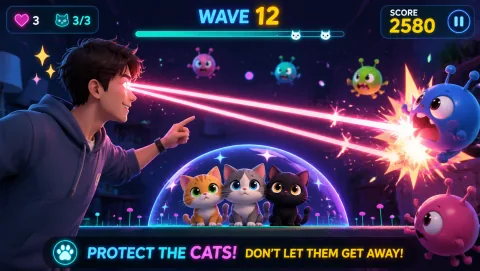
  1. 2 minutes: LaserEyes individual warm-up — everyone plays from their desk, score in chat.
  2. 5 minutes: Reaction or FruitSlash — main challenge, post high scores, team leaderboard.
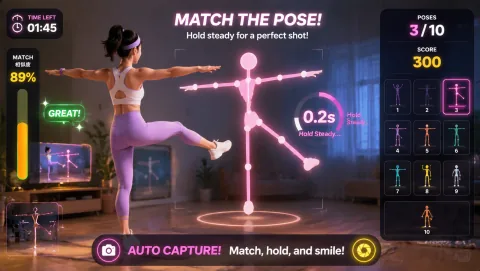
  3. 3 minutes: AwkwardPoseStudio — optional group laugh to close out the session on a high note.

Keep it safe

Safety notes for office settings

Remind participants to clear a movement space before playing arm-based games — a 1-metre radius free of desk items, cables, and furniture. In open offices, designate a specific wellness area away from hot-drink stations and shared equipment. Ensure camera permissions are correctly set before the session to avoid frustrating setup moments during team time. Participation in wellness activities should always be voluntary — never pressure or score-shame team members who prefer to sit out.

Common questions

FAQ

Can multiple people play MovePlay at once?

Each player plays on their own device — MovePlay does not require a shared screen for individual play. For team competitions, players take turns on the same device and compare scores, or run the game on multiple devices simultaneously in a Zoom call. The score-based structure makes distributed team competition natural and easy to facilitate.

How do we use MovePlay in a remote meeting?

Open the meeting as usual. Before the agenda starts, announce a 3-minute MovePlay challenge — everyone opens moveplay.gg on their own device, plays one round of Reaction or AwkwardPoseStudio, and shares their score in the chat. The leaderboard format takes 5 minutes total and significantly improves engagement and energy for the meeting that follows.

Is MovePlay appropriate for corporate settings?

Yes. MovePlay games are designed for all ages and body types with no competitive ranking between players beyond self-reported scores. The games are lighthearted and non-physical-contact, making them suitable for professional team settings. No account creation, data collection, or company information is required to play.

Does MovePlay need webcam permission on work laptops?

MovePlay requires camera permission in the browser — the same permission that Zoom, Teams, and Google Meet use. Most corporate laptops already grant browser camera access for video calls. If your IT policy blocks camera access for non-whitelisted sites, IT will need to add moveplay.gg to the camera permission allowlist.
Ready for your team

Share the link. Start the challenge. Get your team moving.

Open the game hub