Active games for kindergarten

Movement games for kindergarten

Five- and six-year-olds need games that ask for one move at a time and end before their attention does. Here is how to run short, single-action webcam games with a kindergarten class — plus the session structures and teacher moves that keep twenty wiggly kids inside one 5-minute block.

Whack-a-Mole gameplay preview
Whack-a-Mole Moles pop up on screen — reach and tap them. One child plays on the taped square while the rest of the class reaches along from the carpet.
Best for

Best for kindergarten teachers (ages 5–6) who want 2–5 minute active breaks between circle time, centers, and table work — using one laptop, one camera, and a taped square on the floor.

01

Start With One-Move Games

A kindergartener's first webcam game should have exactly one instruction: "tap the mole," "copy the shape," "swipe the fruit." Games that ask for one full-body action let every child succeed on the first try, which matters at five — early failure reads as "I'm bad at this" and the group loses the game for the year. Add multi-action games only after the class already trusts the routine.

02

Plan for 2–4 Minute Attention

Attention span at this age is genuinely short, and a game that outlasts it turns into chaos rather than learning time. Treat one round as the unit of play: a child goes, the class cheers, the next child steps onto the square. Three rounds of two minutes, with three different players, holds a kindergarten group far better than one child playing for six minutes while nineteen wait.

03

Everyone Moves, One Child Scores

The camera only tracks the child on the square, but the other nineteen are not an audience — they are mirror players. When the runner ducks, the carpet ducks. When the mole pops left, twenty arms reach left. The whole class gets the movement break; the child on camera just happens to be the one the score counts for.

The first-month ladder

From one move to many

Kindergarteners build up to complex games the same way they build up to complex instructions — one step at a time. This ladder orders the class's first month of webcam play from simplest to hardest.

Facilitation for five-year-olds

Teacher moves that carry the block

The game runs itself; your job is everything around it. These facilitation habits are what turn a webcam game into a calm, repeatable kindergarten routine.

A 5-minute kindergarten block

One session, timed out

This structure fits between circle time and centers without eating the morning. Total: five minutes, three players, one calm ending.

Minute 0–1: Set the stage

Announce the game in one sentence, point to the taped square, and name the first three players. The rest of the class learns their carpet job: mirror every move. No long explanations — kindergarteners learn this format by watching the first round, not by hearing it described.

Minutes 1–4: Three short rounds

Each child gets roughly a minute on camera. Between rounds, one sentence of specific praise ("you ducked right on time") and the next name. If a round flops, shrug it off and move on — at this age, the teacher's reaction teaches the class how to feel about mistakes.

Minute 4–5: Land calm

Close with the slowest game in your rotation — a seated-friendly round of Bubble Match or quiet head-turn aiming in Laser Eyes. The class's bodies follow the tempo down, and centers start from a settled room instead of a buzzing one.

Calm-down picks

End the block on these

Want the full set? Browse all free games in the webcam games library, or check the motion game compatibility test to confirm your classroom laptop and camera are ready.

Where it fits in the day

Three slots that work in kindergarten

  1. After circle time: the class has just sat still for 10–15 minutes, which is about the ceiling at age five. A 4-minute movement block before sending kids to centers burns off the wiggle that would otherwise surface during the first center rotation.
  2. The before-lunch bridge: the 20 minutes before lunch are the hardest teaching minutes of the kindergarten day. A loud, silly game — Fruit Slash with score commentary — converts that restless energy into shared laughter, and lunch-line behavior improves when kids are not carrying unused energy into the hallway.
  3. Rainy-day recess backup: when outdoor recess is cancelled, a longer webcam session (8–10 minutes with a fast turn rotation) is the closest indoor substitute a single classroom screen can offer. Our Indoor Recess Movement Games for Rainy-Day Classrooms covers longer-session formats for exactly these days.

Room setup

Space and camera notes for little bodies

Tape a square on the floor about two arm-spans wide, facing the camera, and teach it as the only place where the game can see you. Kindergarteners respect a taped boundary far better than a verbal one. Carpet players mirror the moves from their own spots with hands on their own bodies — no neighbor-tapping. Skip the jumping games when the room layout leaves furniture edges inside falling range; reach-and-pose games cover those days fine. Camera framing matters more at this age: five-year-olds are short, so tilt the laptop or camera down until the child on the square fills the frame, or the tracking will hunt for a face that is below its view.

Questions kindergarten teachers ask

FAQ

How long can a kindergartener actually play one game?

Plan for 2 to 4 minutes of focused play per child per round, not the 10-minute sessions older kids manage. Five- and six-year-olds fade fast when a game repeats the same demand, so treat one round as the unit: play, celebrate, rotate. Two or three short rounds with different children beat one long session every time.

Which games should I start with for ages 5 and 6?

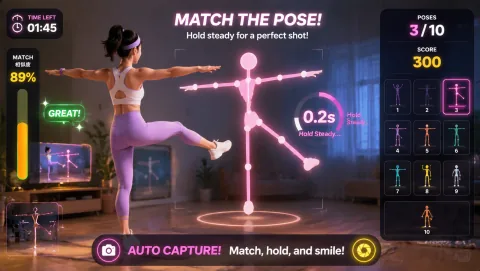
Start with single-action games where the whole body does one obvious thing: reach and tap in Whack-a-Mole, or copy one shape in Awkward Pose Studio. Kindergarteners succeed when the instruction is one sentence long. Save multi-action games like Bunny Hop (jump, duck, and dodge in sequence) for later weeks, once the group already knows how webcam turns work.

How do I run a webcam game with 20 kindergarteners and one camera?

Put one child on a taped square in front of the camera and give everyone else a way to move too: the class mirrors the same reaches, ducks, or poses from their spots on the carpet. Narrate the turn order out loud — "Maya plays, then Leo, then Amara" — because kindergarteners wait far better when they can hear exactly when their turn is coming.

Do movement games replace PE or recess for kindergarten?

No — think of them as short active breaks inside the classroom day, between circle time and table work. They get five-year-olds up and moving for a few minutes, which supports focus when the class sits back down. They do not replace outdoor play, PE, or any curriculum goals, and the games themselves are built for reflexes and fun rather than instruction.

What if a child is too shy to go on camera?

Never make the camera spot mandatory. Offer paired turns (two kids sharing the square), a "coach" role where the shy child calls out the moves for the player, or a hand-only game like Bubble Match where they can stand half off-camera and still reach in. Most kindergarteners volunteer within a week once they have watched classmates survive the spotlight.

MovePlay — Free Webcam Motion Games

Next time the wiggles hit, tape a square and press play.

Play Whack-a-Mole free