Separate camera input from video sharing
A game may need camera input locally; that does not mean a meeting host, platform, or friend should receive the feed. Explain the difference before inviting another person.
Camera confidence
Start with the camera as an input device, not a stage: check the frame, choose a contained game, and keep the session private by default.
Updated August 30, 2026 · Editorial guide based on the current MovePlay game controls

Best for beginners, remote workers, teens, adults, and families who want webcam play without public video or appearance pressure.
A game may need camera input locally; that does not mean a meeting host, platform, or friend should receive the feed. Explain the difference before inviting another person.
Point the camera at a plain, private background, remove personal details when possible, and use a stable position. Feeling in control of the frame lowers avoidable friction.
Let people watch, use hand control, play alone, or stop. A good product path makes the first attempt reversible and does not turn appearance into the measure of success.
Choose by constraint
These are practical starting points based on each game’s actual control style. Test the camera and room before extending the session.
| Your situation | Start with | Why it fits |
|---|---|---|
| I do not want my whole body visible | Laser Eyes or Cyber Knot | Head or hand interaction reduces the need for a full-body frame. |
| I want to practice before inviting anyone | Snake or Gesture Chess | A slower, self-paced round lets you learn the input without a public countdown. |
| I am ready for a friend but not a performance | Bubble Match or Awkward Pose Studio | Use private local turns, optional sharing, and an observer role rather than a public ranking. |
Practical playbook
Keep the first session small, specific, and easy to stop. The goal is not to create a perfect workout. The goal is to make active play feel like a normal option.
Begin with a single short camera-shy motion games round to test the real setup: camera position, lighting, and floor space before inviting a group.
Let the first player choose the opening game, then rotate so everyone gets a turn shaping the session.
Track completion, not perfection: one round finished is already a useful data point.
Why it works
A clear local-camera explanation and an opt-in sharing rule can make the difference between trying a game and abandoning it.
Head, hand, and seated-capable controls can make it easier to start when a full-body frame or large movement feels uncomfortable.
Learning the camera loop alone lets the player decide later whether sharing, score comparison, or a group round is actually wanted.
Sources and limits
These links provide background for the guidance above. They do not turn a MovePlay game into a clinical assessment or guarantee a particular health, learning, or relationship outcome.
Start here
These games are browser-based and use body movement through a webcam. No controller or download required.
Laser Eyes
Micro-turn your head to aim, hold your gaze to fire lasers — eliminate monsters without hitting the cat.
02
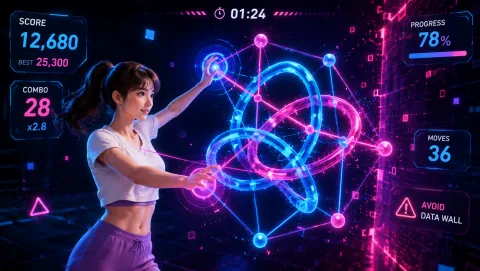 Cyber Knot
Untangle neon data coils — one wrong move and the data stream explodes.
03
Cyber Knot
Untangle neon data coils — one wrong move and the data stream explodes.
03
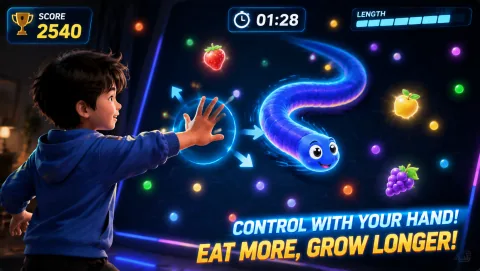 Snake
Guide the snake with your palm position — the longer it grows, the harder it is to turn.
04
Snake
Guide the snake with your palm position — the longer it grows, the harder it is to turn.
04
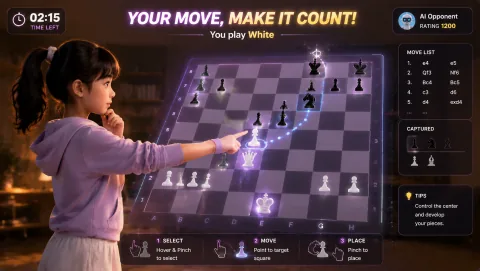 Gesture Chess
Pinch gestures command the pieces — face the AI in a peak showdown and surrender anytime.
Gesture Chess
Pinch gestures command the pieces — face the AI in a peak showdown and surrender anytime.
Simple routine
The goal is not to become camera-confident on command. It is to make one informed, comfortable choice about play.
More options
 Bubble Match
Point both hands at matching bubbles to chain and pop them — rainbow bubbles are wild, bombs clear the area.
06
Bubble Match
Point both hands at matching bubbles to chain and pop them — rainbow bubbles are wild, bombs clear the area.
06
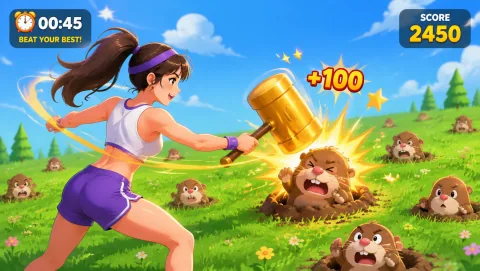 Whack A Mole
Moles pop up — smash them hard. Miss one and the rhythm spirals out of control.
07
Whack A Mole
Moles pop up — smash them hard. Miss one and the rhythm spirals out of control.
07
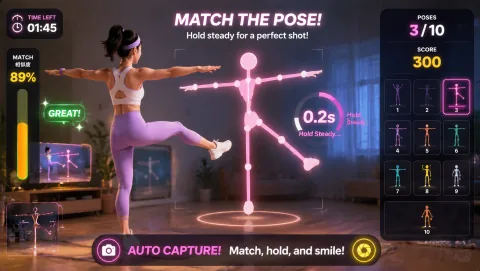 Awkward Pose Studio
Match the tricky body silhouette within 3 seconds and strike a pose for the photo.
Awkward Pose Studio
Match the tricky body silhouette within 3 seconds and strike a pose for the photo.
Keep it realistic
Do not record or share a camera feed without clear consent. Tell household members when the camera is active, avoid exposing private background details, and stop for any physical pain, dizziness, or discomfort.
Common questions
Yes. Camera input can stay local to the game page. Do not record or share the feed unless every person visible has knowingly agreed.
Laser Eyes, Cyber Knot, Snake, and Gesture Chess are contained starting points because they do not require a large performance.
Tell people nearby that the camera is active, aim it at a private background, and keep unconsenting people outside the frame.
Yes. A bounded first attempt is useful information, and stopping is always an available choice.
Move first, scroll later