Play across generations

Multi-generation family motion games that work across different play styles

A good multi-generation game session does not require every person to move at the same speed, use the same range of motion or even stand in front of the camera at the same time. The better design is to make roles, turn length and control style flexible while keeping the game rule obvious.

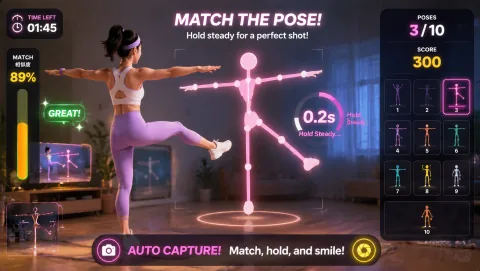
Awkward Pose Studio gameplay preview
Awkward Pose Studio Match the tricky body silhouette within 3 seconds and strike a pose for the photo.
Best for

Best for family visits, holidays, rainy afternoons, and households that want one activity with flexible roles and intensity.

01

Start with one rule everyone can explain

MovePlay is single-screen browser play controlled through a webcam. That makes short turns natural: one person can play while everyone else calls targets, keeps score, chooses the next round or simply watches. The session can still feel shared without forcing identical physical participation.

For the first round, prefer a game whose control can be described in one sentence:

  • point to the matching target;
  • copy the pose;
  • move the paddle left and right;
  • reach for the object;
  • avoid the obstacle.

If the rule needs a long tutorial before anyone can take a turn, it is a poor opener for a mixed-age gathering.

Use the first round as calibration rather than competition. Let each person see how the camera responds and how much movement the control actually requires.

02

Change the role, not the person

A family session becomes more inclusive when participation is broader than “person currently on camera.”

Useful off-camera roles include:

  • target caller;
  • scorekeeper;
  • team strategist;
  • next-game picker;
  • photographer for an agreed family moment;
  • rule explainer for the next player.

These roles are especially useful when someone does not want camera time or when the room only supports one active player safely.

03

Let players choose their own movement range

Do not label a person as the “least capable” player or build the session around assumptions about age. Instead, expose the movement characteristics of each game and let players choose.

A useful game card should state:

  • whether the control is hand, head, pose, torso or full-body led;
  • whether repeated squatting, jumping or stepping is required;
  • whether seated play is supported and tested;
  • approximate movement footprint;
  • whether fast reading or reaction is central to the rule;
  • whether a player can stop between short rounds.

This turns accessibility into a product property rather than a guess about a person.

04

Choose games by control, not by age label

Avoid hard-coded claims such as “for age 4+” unless MovePlay has a documented methodology and review process supporting that label.

Useful families include:

  • pose matching: visually readable, often entertaining for spectators;
  • hand target games: contained movement and simple turns;
  • steering games: easy for the group to understand by watching;
  • reaction games: good for short score challenges when speed is part of the fun;
  • larger full-body games: suitable only when the player opts in and the room supports the movement.

See the live family and kids collections (/collections/).

05

Set up the shared space

Before the first round:

  1. clear the player zone;
  2. keep cables and furniture outside the expected movement path;
  3. position the camera so the control body parts stay visible;
  4. make sure the display remains readable from the required distance;
  5. decide whether photos or recordings are part of the experience before anyone is placed on camera.

MovePlay's gameplay tracking and camera privacy model is explained at Camera privacy (/privacy/camera-games/). If a particular title saves an image or uses a feature beyond live tracking, disclose that at the game level rather than relying on a generic site-wide statement.

06

Make competition optional

Some families enjoy a leaderboard; others enjoy the performance, puzzle or spectacle more than the score.

Use alternatives such as:

  • beat your own previous score;
  • complete one round each;
  • let the group predict the next target;
  • use a shared team total;
  • vote on the funniest pose or most surprising recovery.

The session should not require a fast player to dominate every round.

07

Related guides

  • Webcam games for kids (/guides/webcam-games-for-kids)
  • Small-space webcam games (/guides/small-space-webcam-games)
  • Indoor activities for kids (/guides/indoor-activities-for-kids)
  • Webcam game setup (/guides/webcam-game-setup)
Choose by constraint

Start with the situation, then choose the game

These are practical starting points based on each game’s actual control style. Test the camera and room before extending the session.

Your situationStart withWhy it fits
A younger child wants to leadAwkward Pose Studio or Bubble MatchLet the child choose prompts or colors while the adult manages time and space.
A grandparent or sibling needs a slower roleGesture Chess or Whack A MoleUse strategy, reaching, or short turns and keep a caller or teammate nearby.
The family has different energy levelsReaction plus a hand-led alternativeKeep the same shared theme while letting each person select their movement range.

Practical playbook

How to make this work today

Keep the first session small, specific, and easy to stop. The goal is not to create a perfect workout. The goal is to make active play feel like a normal option.

Why it works

Use behavior design, not pressure

Shared play creates a concrete focus

Recent parent-child activity research describes co-produced play resources as a way to support engagement and social-emotional development. That supports offering a structured shared activity, not claiming a guaranteed family outcome.

Ritual beats novelty

A repeatable ten-minute invitation is easier to trust than a new activity that takes half an hour to explain. Keep the opening and closing predictable.

Flexibility protects participation

Different ages can share a theme while using different posture, pace, turn length, or observer roles.

Simple routine

A four-round family format

  1. Round 1: Readable opener: choose a hand, pose or simple steering game. The objective is for everyone to understand camera control quickly.
  2. Round 2: One-player challenge: one player takes a scored turn while the rest of the group helps with calling or scorekeeping.
  3. Round 3: Choice round: the next player chooses a game with a movement style they prefer. Do not require the same title for every person.
  4. Round 4: Rematch or group finish: end with a rematch, a pose-oriented title or another short rule the group already understands. A clear final round is better than leaving the session open-ended.

More options

Keep the rotation fresh

Keep it realistic

Safety and comfort

A browser game cannot judge whether a movement is appropriate for a particular person. Each player should control their own range of motion and stop if the movement feels painful, unstable or otherwise uncomfortable. Do not describe MovePlay as rehabilitation or therapy unless a specific product and evidence base support that use. For medical or rehabilitation needs, follow qualified professional guidance.

Questions families ask

FAQ

Can children, parents and grandparents play in the same session?

Yes, because the group can rotate games, movement styles and off-camera roles. That does not mean every title is suitable for every person; choose from current control and space requirements rather than relying on age alone.

What if only one person wants to be on camera?

That works well. Keep one active player and give other people optional roles such as caller, scorekeeper, teammate or next-game picker. Rotate only when someone wants a turn.

Which games are easiest to explain?

Look for games with one visible target and one primary action: point, reach, pose, steer or avoid. Use current game metadata rather than a static list because the catalogue changes.

How long should a family session last?

There is no required duration. A four-round rotation creates a useful natural end point; the group can then stop or choose a rematch.

Do all players need the same amount of room?

No. The required space follows the game control. Hand or upper-body games typically use a smaller movement footprint than repeated jumping or wide lateral movement.

Choose your next step

Make the next move fit the moment.

Use the page that matches what you need now: a game, a setting, a tool, or a plan.

Move first, scroll later

Turn a short screen session into active play.

Play Awkward Pose Studio now

Preview the actual game controls

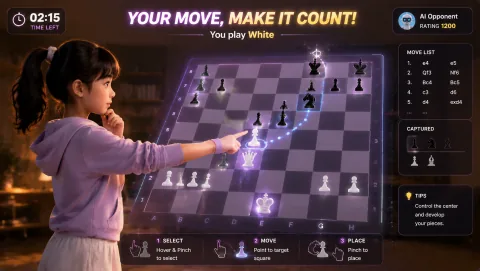
Gesture Chess — Game artwork

Gesture Chess

Move chess pieces by pinching over the board and play against the AI. The decision comes before the gesture.

Controls: Aim at a piece, pinch to select, aim at its destination and pinch again.

First-round idea: Select and place a legal piece move with a steady hand.

Pro · sign-in required

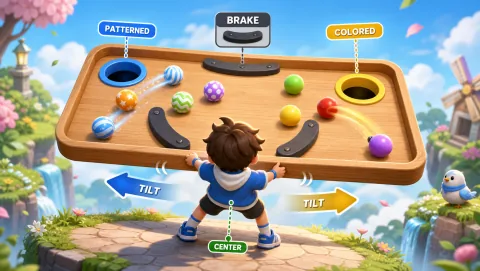
Ball Sort — Game artwork

Ball Sort

Tilt a wooden tray to sort colored and patterned balls into different holes without overshooting.

Controls: Tilt shoulders, return to center to slow, spread arms for fine control.

First-round idea: Guide a ball over a brake pad and into the matching hole.

Pro · sign-in required

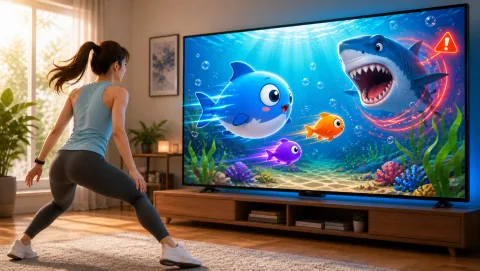
Bubble Feast — Game artwork

Bubble Feast

Guide a big fish toward the target species, dive for schools and react to a shark warning.

Controls: Move sideways, squat to dive and stand to rise.

First-round idea: Eat a target-species fish, then respond to the warning arrow.

Pro · sign-in required

Check current free games and plans →