Audience
The practical question is how to program an active intermission between stage blocks when timing changes throughout the day and transition content must remain flexible.
Bring a reusable interactive format to varied briefs
In a multi-session conference, the first impression matters. Let the host show one cue, run one bounded turn, and let people decide whether they want to join.
A browser, webcam, display, marked zone, and host form a repeatable technical package. Producers can select from live games to match available space and program energy while keeping campaign graphics outside the game itself.
For conference production teams, this is a conference production motion games decision inside a multi-session conference. The pressure is concrete: timing changes throughout the day and transition content must remain flexible.
At the multi-session conference, the station event host starts with AwkwardPoseStudio because timing changes throughout the day and transition content must remain flexible. The host demonstrates full-body pose matching, runs one bounded turn, and hands the station to the next participant so the program can deliver an active intermission between stage blocks. The practical question is how to program an active intermission between stage blocks when timing changes throughout the day and transition content must remain flexible.
The practical question is how to program an active intermission between stage blocks when timing changes throughout the day and transition content must remain flexible.
Start with the smallest workable footprint: Reserve a stage-side or foyer footprint clear of AV control, speaker routes, audience exits, sponsor areas, and catering.
Make the camera boundary honest before anyone is asked to move. For conference production teams, also provide spectator, scorekeeper, and no-camera roles.
If timing changes throughout the day and transition content must remain flexible, use this exit: If the stage manager calls a shorter transition, move to a brief host demonstration or cut the segment without delaying the next session; otherwise move from AwkwardPoseStudio to LaserEyes within the same footprint.
The right first game is the one the host can explain before the room loses patience. Start with the smallest workable version for conference production teams, then compare the alternatives.
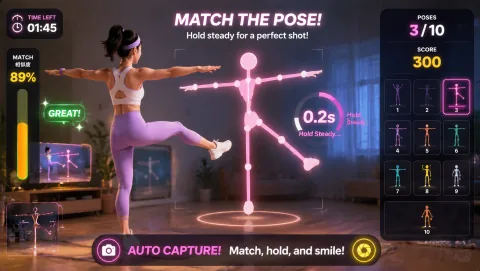
full-body pose matching
AwkwardPoseStudio leads because full-body pose matching supports the specific goal to program an active intermission between stage blocks. Reserve a stage-side or foyer footprint clear of AV control, speaker routes, audience exits, sponsor areas, and catering.
Practical fit: social rounds where the attempt is entertaining for players and spectators. Plan for medium standing space with light-to-moderate movement.

head-position aiming
LaserEyes changes the route through head-position aiming. For Conference production teams in the multi-session conference, offer LaserEyes first to anyone choosing a lower-movement or seated role: its head-position aiming uses seated or standing space with low movement. Also provide spectator, scorekeeper, and no-camera roles.
Practical fit: quiet, contained participation when floor travel is unsuitable. Plan for seated or standing space with low movement.
Two later options: Reaction brings whole-body movement toward visual targets, while PaddleGuard brings side-to-side body movement. Test both against the real pressure that timing changes throughout the day and transition content must remain flexible.
Rehearse Awkward Pose Studio before this moment. Use Awkward Pose Studio as a quiet rehearsal: confirm the person stays visible, the movement is easy to copy, and the next participant knows when to step in.
Open Awkward Pose StudioKeep a second route ready. If timing changes throughout the day and transition content must remain flexible makes the first choice awkward, use the hub to compare a quieter, smaller-footprint, or more social opening for a multi-session conference.
Browse the full game hub01
AwkwardPoseStudio is first only when its medium standing zone is included in the production layout.
02
The host demonstrates full-body pose matching, runs one bounded turn, and hands the station to the next participant so the program can deliver an active intermission between stage blocks.
03
For the multi-session conference, the station event host checks the camera mark, explains AwkwardPoseStudio's full-body pose matching, invites one voluntary turn, resets the result, and offers LaserEyes only while the flow remains clear enough to program an active intermission between stage blocks.
04
If the stage manager calls a shorter transition, move to a brief host demonstration or cut the segment without delaying the next session; otherwise move from AwkwardPoseStudio to LaserEyes within the same footprint.
First-rehearsal standard: The format can program an active intermission between stage blocks without interfering with the main purpose of a multi-session conference.
For Conference production teams in the multi-session conference, offer LaserEyes first to anyone choosing a lower-movement or seated role: its head-position aiming uses seated or standing space with low movement. Also provide spectator, scorekeeper, and no-camera roles.
Keep webcam play separate from badge scans, session attendance, lead retrieval, and the official event recording. Explain the camera interaction before inviting a voluntary participant.
If the stage manager calls a shorter transition, move to a brief host demonstration or cut the segment without delaying the next session; otherwise move from AwkwardPoseStudio to LaserEyes within the same footprint.
Try Awkward Pose Studio and time one complete cycle for conference production teams. Check framing, legibility, choice, and how quickly the room can return to its main purpose.
Conference Production Motion Games may benefit from a broader game rotation. Compare current plan details for broader catalog access; do not assume commercial-use rights, custom branding, event licensing, or any other plan entitlement that is not explicitly listed.
Compare current MovePlay plansAt the multi-session conference, the station event host starts with AwkwardPoseStudio because timing changes throughout the day and transition content must remain flexible.
Reserve a stage-side or foyer footprint clear of AV control, speaker routes, audience exits, sponsor areas, and catering. Keep webcam play separate from badge scans, session attendance, lead retrieval, and the official event recording.
If the stage manager calls a shorter transition, move to a brief host demonstration or cut the segment without delaying the next session; otherwise move from AwkwardPoseStudio to LaserEyes within the same footprint.