Printable session plan · Remote and Hybrid Work

Remote Lunch-Club Games: run of show

A practical, time-bounded plan for employee community hosts in an online lunch club. Use it to rehearse one clear activity without improvising the room, camera, or participation rules.

Keep the plan useful when the room changes

The practical question is how to give casual attendance a repeatable activity format when people join late, leave early, and may not share conversation topics.

This is a run-of-show companion to the broader Remote Lunch-Club Games use-case guide. Its purpose is narrower: help the operator or host run one thoughtful session with a defined start, a clear option to pause, and a prepared fallback.

Webcam input fits equipment many remote workers already use. Hand-tracking and upper-body games provide compact options, while larger-space games can remain available for volunteers with room to move.

Walk through the room before the first turn

01

Set the footprint

Mark and test the operating footprint. Use a personal camera zone that each participant can check against local furniture and coworkers. For this exact online lunch club, protect agenda cues, remote turn-taking, local room differences, and optional participation; GestureChess is first because its profile uses seated or compact standing space with low movement.

02

Open the round

Rehearse the exact opening moment. In the online lunch club, the meeting facilitator starts with GestureChess because people join late, leave early, and may not share conversation topics. The host demonstrates hand pointing and pinch selection, runs one bounded turn, and hands the station to the next participant so the program can give casual attendance a repeatable activity format.

03

Guide the rotation

Assign and rehearse the operator sequence. For the online lunch club, the meeting facilitator checks the camera mark, explains GestureChess's hand pointing and pinch selection, invites one voluntary turn, resets the result, and offers QuickHands only while the flow remains clear enough to give casual attendance a repeatable activity format.

04

Close or change course

Brief privacy and contingency choices before opening. Do not record, screenshot, or score individual feeds without workplace consent. Before the first GestureChess turn in the online lunch club, state that choice and keep opt-out participation available for employee community hosts. At the online lunch club, if people join late, leave early, and may not share conversation topics, use a verbal or chat-based prompt for anyone without a workable camera zone; otherwise move from GestureChess to QuickHands without expanding the marked footprint.
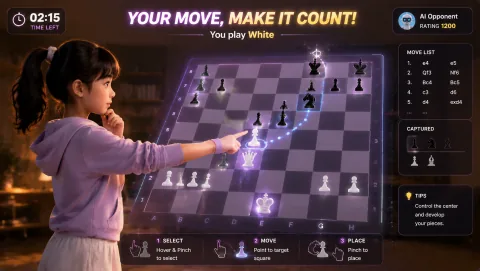

Decision standard: The format can give casual attendance a repeatable activity format without interfering with the main purpose of an online lunch club.

Choose a first round that fits this room

The first choice for an online lunch club should leave room for conversation, late arrivals, and a clean handoff. Use these games as a short test against people join late, leave early, and may not share conversation topics

Quick Hands webcam motion game

hand direction matching with occasional squat cues

Quick Hands

Quick Hands is included for Remote Lunch-Club Games because it uses hand direction matching with occasional squat cues in compact full-body space with adjustable movement.

Play fit: short reaction rounds where hand cues keep the interaction legible For remote lunch-club games, plan for compact full-body space with adjustable movement.

Reaction webcam motion game

whole-body movement toward visual targets

Reaction

Reaction is included for Remote Lunch-Club Games because it uses whole-body movement toward visual targets in medium clear space with moderate movement.

Play fit: fast-reset score challenges and hosted rotations For remote lunch-club games, plan for medium clear space with moderate movement.

Later choices: BubbleMatch. For Employee community hosts in the online lunch club, offer GestureChess first to anyone choosing a lower-movement or seated role: its hand pointing and pinch selection uses seated or compact standing space with low movement. Also provide spectator, scorekeeper, and no-camera roles.

Keep the camera view and the exit clear

Space and light

Use a personal camera zone that each participant can check against local furniture and coworkers. For this exact online lunch club, protect agenda cues, remote turn-taking, local room differences, and optional participation; GestureChess is first because its profile uses seated or compact standing space with low movement. Test camera framing and backlight from that exact zone before the first GestureChess turn.

Access and privacy

For Employee community hosts in the online lunch club, offer GestureChess first to anyone choosing a lower-movement or seated role: its hand pointing and pinch selection uses seated or compact standing space with low movement. Also provide spectator, scorekeeper, and no-camera roles. Do not record, screenshot, or score individual feeds without workplace consent. Before the first GestureChess turn in the online lunch club, state that choice and keep opt-out participation available for employee community hosts. Everyone has the right to opt out, choose an observer role, or stop the activity without having to explain or justify that choice.

Fallback

At the online lunch club, if people join late, leave early, and may not share conversation topics, use a verbal or chat-based prompt for anyone without a workable camera zone; otherwise move from GestureChess to QuickHands without expanding the marked footprint.

Use active play responsibly

Use the plan for employee community hosts to make an online lunch club easier to host, not to make a health claim. If someone has a health or mobility concern, invite qualified professional advice and offer a genuine way to pause or observe.

The WHO Guidelines can frame the wider movement conversation; this plan still needs to follow the privacy, access, and supervision rules that apply to employee community hosts. WHO Guidelines on physical activity and sedentary behaviour.

What to observe here: The format can give casual attendance a repeatable activity format without interfering with the main purpose of an online lunch club.

Answers to settle before the session

What is the opening move for Remote Lunch-Club Games?

In the online lunch club, the meeting facilitator starts with GestureChess because people join late, leave early, and may not share conversation topics. The host demonstrates hand pointing and pinch selection, runs one bounded turn, and hands the station to the next participant so the program can give casual attendance a repeatable activity format.

How should the space and camera be prepared?

Use a personal camera zone that each participant can check against local furniture and coworkers. For this exact online lunch club, protect agenda cues, remote turn-taking, local room differences, and optional participation; GestureChess is first because its profile uses seated or compact standing space with low movement. Test camera framing and backlight from that exact zone before the first GestureChess turn.

What if the planned round no longer fits the room?

At the online lunch club, if people join late, leave early, and may not share conversation topics, use a verbal or chat-based prompt for anyone without a workable camera zone; otherwise move from GestureChess to QuickHands without expanding the marked footprint.