Printable session plan · Small-Space and Lower-Impact Play

Seated Upper-Body Motion Games: run of show

A practical, time-bounded plan for players choosing seated participation in a stable chair setup. Use it to rehearse one clear activity without improvising the room, camera, or participation rules.

Let the format serve the people in the room

The practical question is how to use visible hand and upper-body input in a contained position when many motion games assume standing movement across the floor.

This is a run-of-show companion to the broader Seated Upper-Body Motion Games use-case guide. Its purpose is narrower: help the operator or host run one thoughtful session with a defined start, a clear option to pause, and a prepared fallback.

MovePlay includes games controlled by hands, gestures, poses, and contained upper-body movement. Selecting from those real formats lets players reduce travel across the floor while still interacting through the camera.

Rehearse the handoff before people arrive

01

Set the footprint

Mark and test the operating footprint. Before a stable chair setup, clear one fixed camera zone and check doors, furniture edges, cables, pets, and anyone sharing the room. LaserEyes needs seated or standing space with low movement; if that footprint is unavailable, choose a smaller-movement option instead of rearranging the whole space.

02

Open the round

Rehearse the exact opening moment. Open LaserEyes during a stable chair setup and treat the first head-position aiming round as a complete session, not a warm-up that must continue. That boundary helps players choosing seated participation use visible hand and upper-body input in a contained position even when many motion games assume standing movement across the floor.

03

Guide the rotation

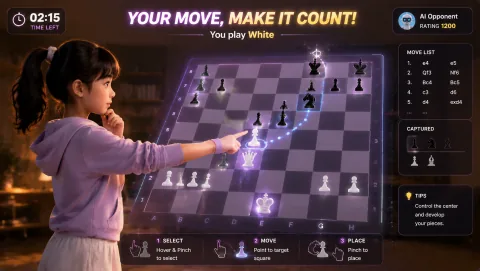
Choose and rehearse the personal sequence. The player starts a stable chair setup by confirming the marked floor area and camera view, then runs one LaserEyes round using head-position aiming. GestureChess is the next option for hand pointing and pinch selection, but continuing is always a fresh choice.

04

Close or change course

Set the privacy and stop choices before starting. Treat the webcam view during a stable chair setup as private household space. Avoid recording, screenshots, and casual sharing; let housemates know when the camera is active and exclude anyone who has not chosen to appear. When many motion games assume standing movement across the floor, make the fallback immediate: switch to LaserEyes, reduce the session to one contained turn, or close the game. Do not widen the footprint or chase intensity simply to complete a plan.

Decision standard: The format can use visible hand and upper-body input in a contained position without interfering with the main purpose of a stable chair setup.

Choose a first round that fits this room

Choose the opening round for the actual energy of a stable chair setup, not for an abstract idea of intensity. If the first option feels wrong, keep the goal and change the control style.

Gesture Chess webcam motion game

hand pointing and pinch selection

Gesture Chess

Gesture Chess is included for Seated Upper-Body Motion Games because it uses hand pointing and pinch selection in seated or compact standing space with low movement.

Play fit: calm, self-paced sessions where strategy matters more than speed For seated upper-body motion games, plan for seated or compact standing space with low movement.

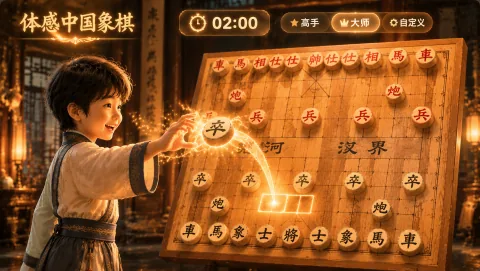
Gesture Xiangqi webcam motion game

hand pointing and pinch selection

Gesture Xiangqi

Gesture Xiangqi is included for Seated Upper-Body Motion Games because it uses hand pointing and pinch selection in seated or compact standing space with low movement.

Play fit: calm strategy turns for players who already know or want to explore Xiangqi For seated upper-body motion games, plan for seated or compact standing space with low movement.

Later choices: Snake. a stable chair setup does not need a fixed intensity target. Move to LaserEyes for head-position aiming in seated or standing space with low movement, take a watching role, or end after one round when any of those choices fits better.

Protect the room and the right to opt out

Space and light

Before a stable chair setup, clear one fixed camera zone and check doors, furniture edges, cables, pets, and anyone sharing the room. LaserEyes needs seated or standing space with low movement; if that footprint is unavailable, choose a smaller-movement option instead of rearranging the whole space. Test camera framing and backlight from that exact zone before the first LaserEyes turn.

Access and privacy

a stable chair setup does not need a fixed intensity target. Move to LaserEyes for head-position aiming in seated or standing space with low movement, take a watching role, or end after one round when any of those choices fits better. Treat the webcam view during a stable chair setup as private household space. Avoid recording, screenshots, and casual sharing; let housemates know when the camera is active and exclude anyone who has not chosen to appear. Everyone has the right to opt out, choose an observer role, or stop the activity without having to explain or justify that choice.

Fallback

When many motion games assume standing movement across the floor, make the fallback immediate: switch to LaserEyes, reduce the session to one contained turn, or close the game. Do not widen the footprint or chase intensity simply to complete a plan.
Use active play responsibly

The useful evidence in a stable chair setup is operational: can people see the cue, understand the turn, and stop without disruption? Treat the activity as active play, not as a substitute for clinical or educational judgment.

The relevant check is practical: can players choosing seated participation see the cue, understand the turn, and stop comfortably? The WHO Guidelines provide context, not a promise about this activity. WHO Guidelines on physical activity and sedentary behaviour.

What to observe here: The format can use visible hand and upper-body input in a contained position without interfering with the main purpose of a stable chair setup.

Answers to settle before the session

What is the opening move for Seated Upper-Body Motion Games?

Open LaserEyes during a stable chair setup and treat the first head-position aiming round as a complete session, not a warm-up that must continue. That boundary helps players choosing seated participation use visible hand and upper-body input in a contained position even when many motion games assume standing movement across the floor.

How should the space and camera be prepared?

Before a stable chair setup, clear one fixed camera zone and check doors, furniture edges, cables, pets, and anyone sharing the room. LaserEyes needs seated or standing space with low movement; if that footprint is unavailable, choose a smaller-movement option instead of rearranging the whole space. Test camera framing and backlight from that exact zone before the first LaserEyes turn.

What if the planned round no longer fits the room?

When many motion games assume standing movement across the floor, make the fallback immediate: switch to LaserEyes, reduce the session to one contained turn, or close the game. Do not widen the footprint or chase intensity simply to complete a plan.