01
Set the footprint
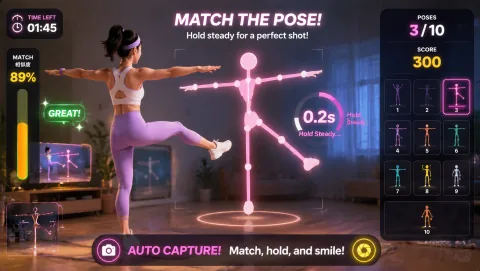
Mark and test the operating footprint. Each household checks its own camera zone for furniture, pets, cables, and other people before the call. AwkwardPoseStudio works only for relatives with a medium standing footprint; LaserEyes provides a seated alternative in tighter rooms.
02
Open the round
Rehearse the exact opening moment. At the shared video call, the meeting facilitator starts with AwkwardPoseStudio because ordinary calls can become repetitive when participants span ages and locations. The host demonstrates full-body pose matching, runs one bounded turn, and hands the station to the next participant so the program can add structured play to a remote family visit.
03
Guide the rotation
Assign and rehearse the operator sequence. One family member explains a single AwkwardPoseStudio turn, lets each household choose whether to play or watch, and moves to LaserEyes when a relative wants a quieter seated role or has less room on camera.
04
Close or change course
Brief privacy and contingency choices before opening. Do not record or screenshot relatives without everyone’s agreement, and remember that one household’s consent does not cover another. Children and anyone off camera should be able to join by watching, guessing, or keeping score. At the shared video call, if ordinary calls can become repetitive when participants span ages and locations, use a verbal or chat-based prompt for anyone without a workable camera zone; otherwise move from AwkwardPoseStudio to LaserEyes without expanding the marked footprint.