Printable session plan · Creators, Streams, and Live Events

Creator Meetup Icebreaker Games: run of show

A practical, time-bounded plan for creator community organizers in an in-person meetup. Use it to rehearse one clear activity without improvising the room, camera, or participation rules.

Keep the plan useful when the room changes

The practical question is how to help followers and creators interact around a shared prompt when attendees may recognize online identities but still find face-to-face introductions awkward.

This is a run-of-show companion to the broader Creator Meetup Icebreaker Games use-case guide. Its purpose is narrower: help the operator or host run one thoughtful session with a defined start, a clear option to pause, and a prepared fallback.

Short visual rounds are easy to commentate and can be scheduled between longer segments. Creators can rotate players, invite informal predictions, or compare attempts without claiming the games are custom productions.

Rehearse the handoff before people arrive

01

Set the footprint

Mark and test the operating footprint. Use one camera-ready mark clear of creator tables, signing lines, tripods, refreshments, doors, and accessible circulation. AwkwardPoseStudio is first only where its medium standing footprint fits without swallowing the conversation area.

02

Open the round

Rehearse the exact opening moment. In the in-person meetup, the meeting facilitator starts with AwkwardPoseStudio because attendees may recognize online identities but still find face-to-face introductions awkward. The host demonstrates full-body pose matching, runs one bounded turn, and hands the station to the next participant so the program can help followers and creators interact around a shared prompt.

03

Guide the rotation

Assign and rehearse the operator sequence. The meetup host checks the camera mark, demonstrates one AwkwardPoseStudio pose, invites an optional turn, resets the result, and offers LaserEyes when someone wants a quieter or seated role on the same shared screen.

04

Close or change course

Brief privacy and contingency choices before opening. Do not assume that being a follower, creator, or ticket holder grants consent to camera play or social posting. Explain the webcam interaction and ask again before saving or sharing any attendee image. If the room prefers conversation or the floor becomes crowded, switch to a creator-led introduction prompt or one demonstration; otherwise move from AwkwardPoseStudio to LaserEyes without expanding the footprint.
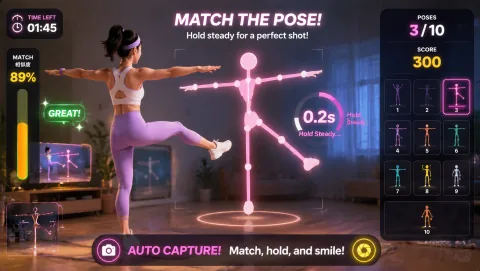

Decision standard: The format can help followers and creators interact around a shared prompt without interfering with the main purpose of an in-person meetup.

Choose a first round that fits this room

Choose the opening round for the actual energy of an in-person meetup, not for an abstract idea of intensity. If the first option feels wrong, keep the goal and change the control style.

Laser Eyes webcam motion game

head-position aiming

Laser Eyes

Laser Eyes is included for Creator Meetup Icebreaker Games because it uses head-position aiming in seated or standing space with low movement.

Play fit: quiet, contained participation when floor travel is unsuitable For creator meetup icebreaker games, plan for seated or standing space with low movement.

Fruit Slash webcam motion game

alternating arm swipes

Fruit Slash

Fruit Slash is included for Creator Meetup Icebreaker Games because it uses alternating arm swipes in compact-to-medium standing space with moderate upper-body movement.

Play fit: fast visual challenges that are easy to commentate For creator meetup icebreaker games, plan for compact-to-medium standing space with moderate upper-body movement.

Later choices: QuickHands. For Creator community organizers in the in-person meetup, offer LaserEyes first to anyone choosing a lower-movement or seated role: its head-position aiming uses seated or standing space with low movement. Also provide spectator, scorekeeper, and no-camera roles.

Protect the room and the right to opt out

Space and light

Use one camera-ready mark clear of creator tables, signing lines, tripods, refreshments, doors, and accessible circulation. AwkwardPoseStudio is first only where its medium standing footprint fits without swallowing the conversation area. Test camera framing and backlight from that exact zone before the first AwkwardPoseStudio turn.

Access and privacy

For Creator community organizers in the in-person meetup, offer LaserEyes first to anyone choosing a lower-movement or seated role: its head-position aiming uses seated or standing space with low movement. Also provide spectator, scorekeeper, and no-camera roles. Do not assume that being a follower, creator, or ticket holder grants consent to camera play or social posting. Explain the webcam interaction and ask again before saving or sharing any attendee image. Everyone has the right to opt out, choose an observer role, or stop the activity without having to explain or justify that choice.

Fallback

If the room prefers conversation or the floor becomes crowded, switch to a creator-led introduction prompt or one demonstration; otherwise move from AwkwardPoseStudio to LaserEyes without expanding the footprint.

Use active play responsibly

The useful evidence in an in-person meetup is operational: can people see the cue, understand the turn, and stop without disruption? Treat the activity as active play, not as a substitute for clinical or educational judgment.

The WHO Guidelines can frame the wider movement conversation; this plan still needs to follow the privacy, access, and supervision rules that apply to creator community organizers. WHO Guidelines on physical activity and sedentary behaviour.

What to observe here: The format can help followers and creators interact around a shared prompt without interfering with the main purpose of an in-person meetup.

Answers to settle before the session

What is the opening move for Creator Meetup Icebreaker Games?

In the in-person meetup, the meeting facilitator starts with AwkwardPoseStudio because attendees may recognize online identities but still find face-to-face introductions awkward. The host demonstrates full-body pose matching, runs one bounded turn, and hands the station to the next participant so the program can help followers and creators interact around a shared prompt.

How should the space and camera be prepared?

Use one camera-ready mark clear of creator tables, signing lines, tripods, refreshments, doors, and accessible circulation. AwkwardPoseStudio is first only where its medium standing footprint fits without swallowing the conversation area. Test camera framing and backlight from that exact zone before the first AwkwardPoseStudio turn.

What if the planned round no longer fits the room?

If the room prefers conversation or the floor becomes crowded, switch to a creator-led introduction prompt or one demonstration; otherwise move from AwkwardPoseStudio to LaserEyes without expanding the footprint.